
TikTok Events API on WordPress: what's required, what isn't
TikTok asks for Automatic Advanced Matching, first-party cookies and enhanced postback by default during onboarding. None of those are required to track conversions. All of them are GDPR risk. The actual minimum config in two screens, plus what the consent banner needs to do for it to work.
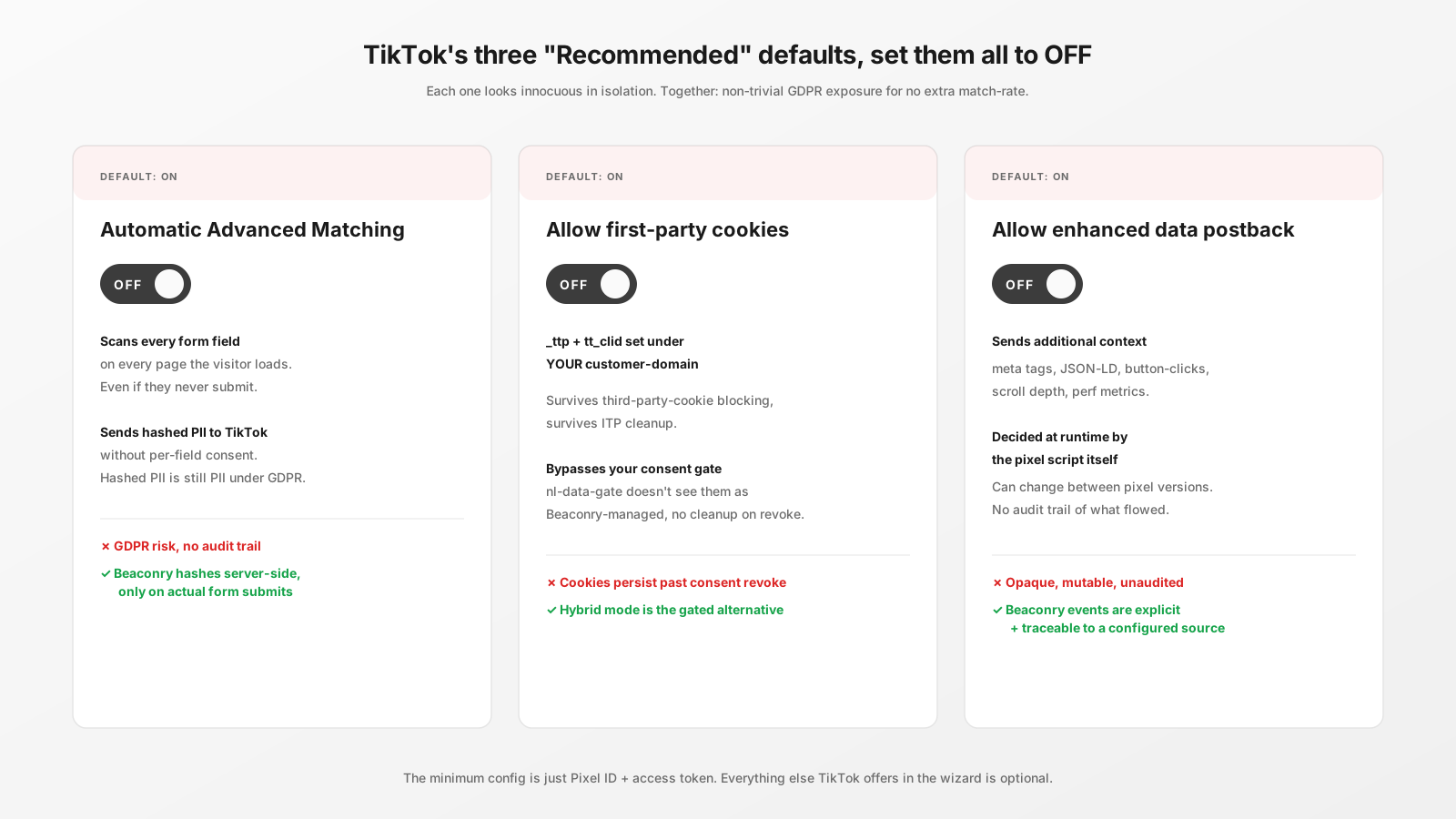
What TikTok onboarding tries to default-on
When you create a Web Events data source in TikTok Ads Manager, a wizard walks you through a series of screens. Three of those screens have toggles labelled "Recommended" that are pre-set to enabled. Each one, individually, looks innocuous. Together they constitute a non-trivial GDPR exposure that you don't actually need for the conversion tracking to work.
The three:
- Automatic Advanced Matching.
- Allow first-party cookies.
- Allow enhanced data postback.
Default is "on" for all three. The minimum required config is "off" for all three.
Automatic Advanced Matching
What TikTok says it does: improves match-rate by automatically capturing customer information from form fields and sending it to TikTok hashed.
What it actually does: scans every form field on every page the visitor loads. When the visitor types into an email or phone field, even if they never submit the form, TikTok's pixel reads the value, hashes it client-side, and sends it to TikTok along with subsequent events.
Why it's GDPR risk: this is collection of PII (email, phone) without per-field consent. The visitor consented to "marketing cookies" maybe, but they didn't consent to TikTok seeing every form field they ever interacted with on your site. The hashing doesn't help, hashed PII is still PII under GDPR.
Why you don't need it: Beaconry hashes the same fields server-side, with controlled code paths, only for forms that the visitor actually submits. Same match-rate boost, dramatically smaller surface area.
Set to: OFF.
Allow first-party cookies
What TikTok says it does: lets the TikTok pixel set cookies under your customer-domain instead of TikTok's domain, "improving cross-browser tracking".
What it actually does: lets TikTok write _ttp and related cookies on your domain. From the visitor's browser perspective, those cookies are now first-party to you, which means they survive the visitor's third-party-cookie-blocking, ITP, and the like.
Why it's a problem: it bypasses your consent gate. Beaconry's nl-data-gate won't see _ttp as a Beaconry-managed cookie, so when the visitor revokes consent, the cookie doesn't get cleaned up. They've consented to Beaconry tracking, not to TikTok pixel cookies persisting on your domain.
Why you don't need it: hybrid mode achieves the same first-party-cookie outcome explicitly, gated through your consent banner, removable on revoke. Auto-set first-party cookies are the same outcome with worse hygiene.
Set to: OFF.
Allow enhanced data postback
What TikTok says it does: sends "additional context" from the page to improve attribution accuracy.
What it actually does: sends page meta tags, structured data (JSON-LD), recent button-clicks, scroll depth, page performance metrics, and a few other browser-side signals to TikTok along with each event. None of which you explicitly configured to track.
Why it's a problem: you have no audit trail of what's being sent. The TikTok pixel decides at runtime what counts as "additional context", and it can change between pixel versions without you noticing. This is the most opaque of the three toggles.
Why you don't need it: the events Beaconry sends are explicit and auditable. Every payload field is traceable to either a configured event or an explicit Beaconry default. Enhanced postback adds noise, not signal, and it does so without your visibility.
Set to: OFF.
The business-funnel template selector
TikTok asks you to pick a "Business funnel template" during the same wizard flow. Options are E-commerce, Lead generation, Travel, Other. This one is harmless. The template only presets which conversion goals TikTok suggests in their UI; it has no impact on what data flows or what events are recognised. Pick whichever roughly matches your business or "Other" if nothing fits. If TikTok doesn't let you skip, pick E-commerce as a safe default.
The actual minimum config
Two values are required, no more, no less:
- Pixel ID (alphanumeric, ~20 characters). Visible at the top of the Pixel page after creation.
- Access Token (long, opaque string). Generated under Pixel-Settings → Events API → Set up manually → Generate Access Token. Shown once, copy immediately.
Both go into Beaconry → Tracking → TikTok. Save. Click "Send TikTok test event". HTTP 200 with code: 0 means it works.
How the event flow looks with the minimum config
On a WooCommerce purchase, with all three TikTok-default toggles off and the Beaconry minimum config on:
- Visitor lands from a TikTok ad with
?ttclid=...in the URL. - Beaconry captures
ttclid, persists innl_extfirst-party cookie (Beaconry-managed, consent-gated). - Visitor browses, adds to cart, completes checkout.
- Beaconry's purchase event fires server-side via TikTok Events API:
ttclidfromnl_ext, hashed email/phone/name from WooCommerce order, stableevent_id, value, currency, line items. - TikTok attributes the conversion to the original ad-click. Done.
No browser pixel. No Automatic Advanced Matching. No first-party TikTok cookies on your domain. No enhanced postback. Match-rate is good because ttclid is the strongest single attribution signal TikTok has, and Beaconry sends it for every event.
What the consent banner needs to do
Beaconry's nl-data-gate is what you ship by default; it does the right thing. If you use a different CMP (CookieYes, Complianz), make sure of two things:
- The CMP sets a cookie or local-storage flag that Beaconry reads as
analytics-accepted. Beaconry won't fire any event before that. - On revoke, the CMP triggers a cleanup that removes
nl_pref,nl_ext, and any Beaconry-managed cookies. Beaconry has an event hook for this; the CMP just needs to fire it.
If you also have hybrid mode on for TikTok, the browser pixel script also gets gated through the same flag, Beaconry only loads the script after consent.
Common configuration mistakes
- Leaving "Allow first-party cookies" on. Most common. Leads to
_ttpcookies surviving consent revoke. GDPR-side audit will flag it. - Pasting the Pixel ID without the access token. Beaconry will silently skip TikTok dispatch. Logs tab shows "credentials incomplete".
- Setting Test Event Code and forgetting to remove it. Live events go to Test Events tab, Campaign Manager doesn't see them. Easy to miss for weeks.
- Picking "Events API only" connection method. Locks out hybrid mode for later. Always pick "TikTok Pixel + Events API (Recommended)", the combined option, even if you start server-side only.
Take-away
TikTok's default onboarding gives them more data than they need to attribute your conversions. None of the "Recommended" toggles are required for the Events API to work; all of them constitute non-trivial GDPR exposure. The actual minimum config is two strings (Pixel ID + access token), one URL parameter (ttclid) and a consent gate that controls when events leave the browser. Everything else TikTok offers in the wizard is optional and, in our reading, not in the customer's interest to enable.