
How Beaconry survives LiteSpeed, WP Rocket and Cloudflare
Cache and JS-optimization plugins are the quiet killers of conversion tracking. Delay-JS waits for a click that often never comes, Combine reorders your init block, Rocket Loader rewrites your script tag. Beaconry opts itself out of every JS optimizer it can verify against the vendor's own docs, and refreshes its REST nonce in the browser so a tab open for hours, or a page served from full-page cache, keeps posting valid events. Here is exactly what it does and the two cases you still have to handle by hand.
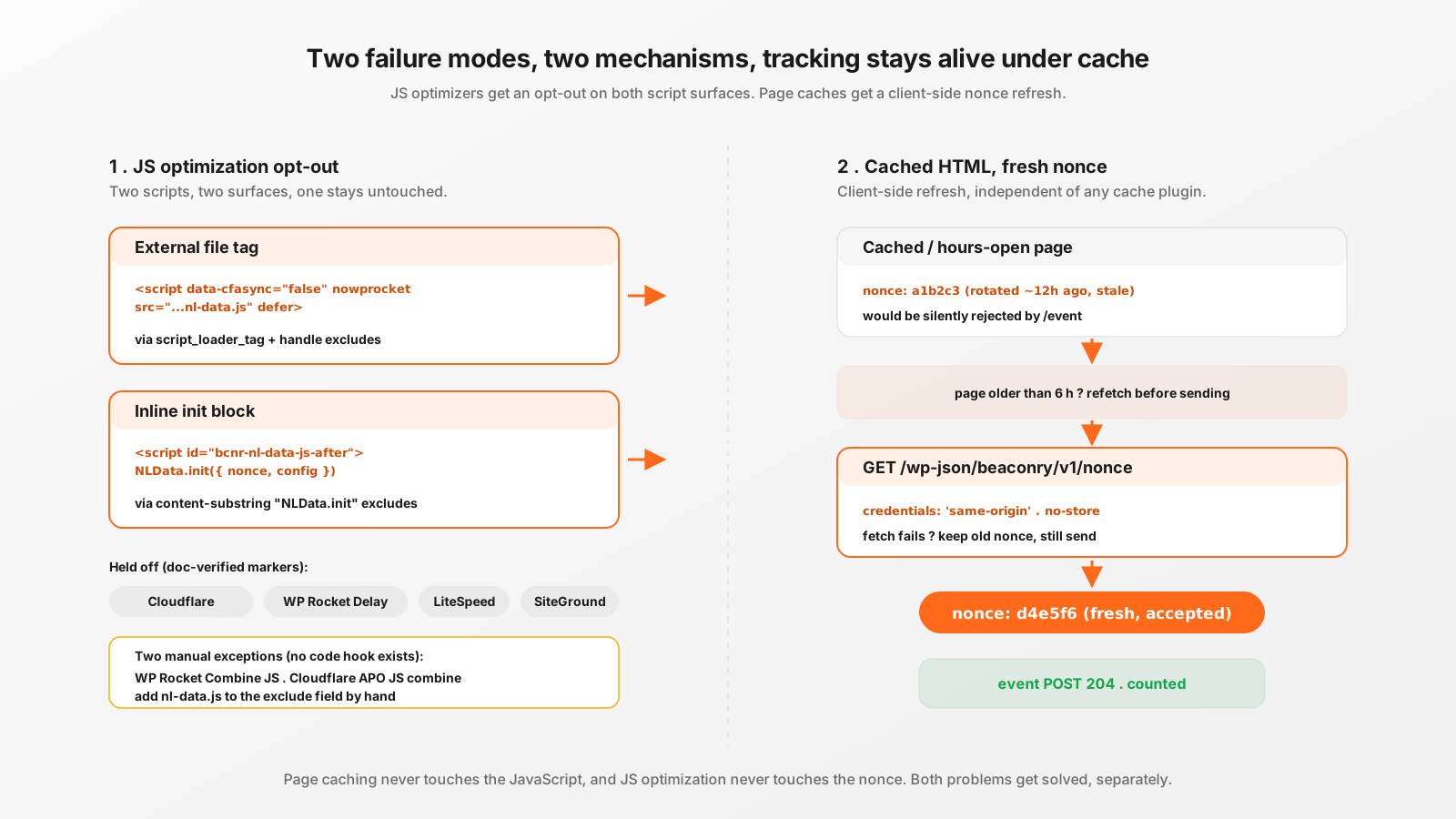
Two failure modes, and they are different
People lump "cache plugin broke my tracking" into one bucket. It is really two unrelated problems, and Beaconry solves them with two unrelated mechanisms.
The first is JavaScript optimization: Delay JavaScript Execution, Combine JS, Minify, and Cloudflare Rocket Loader. These rewrite or reschedule the script that fires your events. The second is full-page HTML caching: the same HTML document, including the embedded security nonce, gets served to thousands of visitors and to the same visitor hours later. The nonce inside it goes stale. Page caching does not touch your JavaScript at all, so a fix for one does nothing for the other.
If you only think about JS optimization you ship a plugin that still goes dark on any site with a long-lived tab or aggressive page cache. If you only think about page caching you ship one that gets its init block deferred into oblivion. You need both.
Why Delay-JS is the one that actually hurts
Most JS optimizers degrade tracking. Delay JavaScript Execution destroys it. The feature is built to hold every non-critical script until the first user interaction (scroll, mousemove, touch, key) so the page hits a great Lighthouse score with zero JS on the critical path. Wonderful for paint metrics. Fatal for a pageview event, because a large share of sessions, bounces, one-tap-and-gone mobile visits, prefetched pages, never produce that first interaction. No interaction, no script, no event. The conversion happened and your analytics never heard about it.
Combine JS and Rocket Loader are subtler. They do not block execution outright, they reorder it. Beaconry enqueues two things: the external nl-data.js file (deferred, in the footer) and a small inline block that calls NLData.init() with the page's runtime config and security nonce. If a combiner merges the external file into one bundle but leaves the inline init where it was, or Rocket Loader async-rewrites the file tag, the inline call can run before the engine it depends on exists. The pageview throws instead of firing.
So the goal is narrow and specific: keep Beaconry's two scripts out of every JS optimizer, without disabling those optimizers for the rest of the site. The customer keeps their 95+ Lighthouse score on everything else. Only two script handles get carved out.
The two-surface problem
Here is the detail that trips up most tracking plugins. WordPress gives you the script_loader_tag filter to rewrite a script's HTML tag, which is how you add an opt-out attribute. But that filter only ever sees the external file tag, the <script src="...nl-data.js">. It never sees the separate inline block that wp_add_inline_script() emits, the one that actually calls NLData.init() and fires the pageview. That inline block renders as its own <script id="bcnr-nl-data-js-after"> element, and script_loader_tag cannot touch it.
Which means an attribute-based opt-out protects the engine file but leaves the line that runs it exposed. You have to protect both surfaces, and they need different mechanisms:
- The external file is protected with tag attributes (for Cloudflare and WP Rocket Delay) plus handle-based exclude filters (for LiteSpeed and SiteGround).
- The inline init block is protected with content-substring exclude filters, because there is no tag attribute to add. Beaconry registers the stable substring
NLData.initon the two optimizers that expose a documented inline-exclude hook.
The two handles in question are bcnr-nl-data and bcnr-nl-data-gate (the tracking engine and the consent banner engine). Everything below operates on exactly those two and nothing else, so it is idempotent and side-effect free for the rest of your scripts.
The doc-verified opt-out matrix
This is the part where the GOTT-REGEL earns its keep: every single marker below was confirmed verbatim against the cache plugin's own documentation, not a blog post, not a forum thread. An adversarial verification pass killed 30 of 41 candidate markers because they were folklore that never appears in an official doc. Here is what made the cut.
External script tag
Beaconry's script_loader_tag filter prepends two attributes to its own two tags, in the order the vendors require:
<script data-cfasync="false" nowprocket
src="...assets/vendor/nl-data/nl-data.js" defer></script>data-cfasync="false"tells Cloudflare Rocket Loader to ignore the script. Cloudflare requires this attribute to appear beforesrc, which is why Beaconry injects it right after the opening<script.nowprockettells WP Rocket to never apply Delay JavaScript Execution to the file. This is the marker that matters most, because Delay-JS is the optimizer that fully breaks tracking rather than just reordering it.
Handle-based excludes (LiteSpeed and SiteGround)
LiteSpeed Cache and SiteGround Speed Optimizer do not expose a tag attribute. They expose filter hooks that take a list of script handles. Beaconry appends its two handles to each:
- LiteSpeed, three filters covering every JS axis:
litespeed_optimize_js_excludes(Combine and Minify),litespeed_optm_js_defer_exc(Defer and Delay),litespeed_optm_gm_js_exc(Guest Mode JS, the optimized variant LiteSpeed serves to logged-out visitors). - SiteGround, three filters:
sgo_js_async_exclude(async and defer),sgo_js_minify_exclude(minify),sgo_javascript_combine_exclude(combine).
Inline-block excludes (WP Rocket and SiteGround)
For the inline NLData.init() block, two optimizers expose a documented content-substring exclude. Beaconry registers the substring NLData.init on both:
- WP Rocket:
rocket_defer_inline_exclusions, so the init block is never deferred or delayed. - SiteGround:
sgo_javascript_combine_excluded_inline_content, so the init block is never folded into a combined bundle.
All of this is registered automatically on plugin load. There is no setting to flip. If you run one of these plugins, the filters are already attached and they no-op cleanly if the plugin is absent.
The two manual exceptions
Honesty matters more than a clean compatibility table. Two optimizers cannot be auto-excluded, because the vendor ships no code-level hook for them. If you have these specific features on, you add one line each by hand.
- WP Rocket, Combine JavaScript. There is no documented filter or attribute to exclude a file or inline script from Combine, only the admin-UI fields under File Optimization. If you enable Combine JS, add
nl-data.jsto "Excluded JavaScript Files" and anNLData.initsnippet to "Excluded Inline JavaScript". Worth knowing: Combine is legacy and off by default on HTTP/2 (which is almost every host now). Delay-JS is the WP Rocket feature that actually breaks tracking, and that one IS auto-excluded vianowprocket. So in practice most WP Rocket users need to do nothing. - Cloudflare, Auto Minify (legacy) or APO JS combine. These are zone-level dashboard toggles under Speed, Optimization, with no per-script origin marker. Minify alone does not break execution order, so it is harmless. Rocket Loader is the only Cloudflare JS optimizer that reorders execution, and that one IS auto-handled by
data-cfasync="false". If you run APO with JS combine, exclude the path or leave JS combine off.
Everything else is covered automatically. WP Super Cache, W3 Total Cache, Autoptimize and WP Fastest Cache in plain page-cache mode never reach Beaconry's JavaScript, so they need no exclude at all. If you run one of them with aggressive JS combine turned on, the same generic advice applies: exclude nl-data.js from JS optimization. Page caching by itself is already safe, which is the entire point of the next section.
Page caching and the stale nonce
Now the second failure mode. Beaconry's REST endpoint, /wp-json/beaconry/v1/event, is protected by a WordPress nonce. The inline config embeds a fresh wp_create_nonce('beaconry_event') on render, nl-data attaches it to every event POST, and the server drops any event whose nonce does not verify. That nonce is part of the anti-abuse layer: without it, anyone on the open internet could POST fake conversions, burn your Meta CAPI quota, or poison your GA4 reports.
WordPress nonces are time-bound. They rotate roughly every 12 hours and stay valid for about 24. That is fine for a freshly rendered page. It is a problem the moment full-page caching enters the picture, because now the nonce is frozen into a cached HTML document:
- A visitor opens a tab and leaves it open for 14 hours. The nonce embedded at load time has since rotated out.
- Your page cache serves an HTML document generated 20 hours ago. Every visitor who lands on it gets a nonce that is already past its window.
- A guest session rotates underneath a long-lived page.
In every case the embedded nonce is now one the REST endpoint rejects, so each event POST is silently dropped. The user is still on your site, still converting, and the events evaporate at the door.
Client-side nonce refresh
The fix lives in the browser engine and is completely independent of which cache plugin you run, that is what makes it robust. nl-data stamps the timestamp when it received its nonce. Before it transmits an event, it checks the nonce's age. If the page has been open longer than the refresh window, it fetches a fresh nonce from a dedicated GET endpoint, swaps it in, then sends:
function ensureFreshNonce( cb ) {
    if ( !_config || !_config.nonce ) { cb(); return; }
    if ( ( Date.now() - _nonceTs ) < NONCE_REFRESH_MS ) { cb(); return; }
    var url = _config.endpoint.replace( /\/event$/, '/nonce' );
    fetch( url, {
        method:      'GET',
        credentials: 'same-origin',
        headers:     { 'Accept': 'application/json' },
    } )
        .then( function ( r ) { return r && r.ok ? r.json() : null; } )
        .then( function ( j ) {
            if ( j && j.nonce ) { _config.nonce = j.nonce; _nonceTs = Date.now(); }
        } )
        .catch( function () { /* keep existing nonce on failure */ } )
        .then( function () { cb(); } );
}
The details that make this safe rather than clever:
- The refresh window is 6 hours, comfortably inside the ~24 hour validity window. So a nonce never gets close to expiring before it is replaced, and the refresh fetch fires at most a handful of times across an all-day session, not on every event.
credentials: 'same-origin'sends the session cookies, so the newly minted nonce is bound to the same guest session the visitor already has. A nonce fetched without that would verify against a different session and be useless.- Failure is non-fatal. If the fetch errors, the
.catchkeeps the existing nonce and the event still attempts to send. A stale-but-maybe-valid nonce beats no event. - Fresh pages and Worker endpoints short-circuit. A page younger than 6 hours invokes the callback synchronously with no network hop, so normal traffic is never delayed. NETZLICHT's Worker-based framework sites carry no nonce at all, so the whole path is skipped for them.
Keeping the nonce endpoint itself uncacheable
There is one last trap. The refresh endpoint, /wp-json/beaconry/v1/nonce, is a GET request, and full-page caches like LiteSpeed will happily cache GET responses to /wp-json/*. If that response gets cached, the refresh hands out the same frozen nonce it was supposed to replace, and you are back where you started. So the endpoint marks itself non-cacheable on both axes:
do_action( 'litespeed_control_set_nocache', 'beaconry nonce must always be fresh' );

$response = new WP_REST_Response( [ 'nonce' => wp_create_nonce( 'beaconry_event' ) ], 200 );
$response->header( 'Cache-Control', 'no-store, max-age=0' );
The standard Cache-Control: no-store header covers most proxies and CDNs. LiteSpeed ignores plain Cache-Control for its own cache decisions, so the endpoint also fires litespeed_control_set_nocache, LiteSpeed's documented control API. The do_action is a harmless no-op when LiteSpeed is not installed. Exposing the nonce on a public GET adds no attack surface, the same nonce is already sitting in every page's inline config in plain sight, and the real gate is the per-IP rate-limit plus the consent and nonce checks on the event endpoint itself.
How to verify it on your own site
You do not have to trust the table. Confirm it in the browser:
- View source on a cached page. Find the
<script>tag fornl-data.js. It should carrydata-cfasync="false"andnowprocket. If those attributes are present, Rocket Loader and WP Rocket Delay are both opted out. - DevTools Network tab, leave the tab open. After the page has been open more than 6 hours (or temporarily lower the constant on a staging copy), the next event should be preceded by a GET to
/wp-json/beaconry/v1/noncereturning a fresh value, and the following event POST carries it. - Check the response headers on that GET. It should return
Cache-Control: no-store. Hit it twice and confirm you get two different nonce values, proof the cache is not freezing it. - Watch the event POST. A 204 with the nonce in the request body means the server accepted it. If you ever see events stop after the page sits open, the nonce path is the first place to look.
Take-away
Server-side tracking does not automatically survive a cache stack. The events still originate from a browser script, and that script lives in the same hostile environment as every other one on the page: optimizers that delay it, combiners that reorder it, page caches that freeze its credentials. Beaconry treats this as two separate engineering problems. For JS optimization it opts its two handles out of every marker it can verify against a vendor's own docs, and it tells you plainly about the two cases (WP Rocket Combine, Cloudflare APO combine) where no code hook exists. For page caching it refreshes the REST nonce in the browser on a 6 hour cycle, bound to the visitor's session, failing soft, with the refresh endpoint itself held uncacheable. The result is tracking that keeps working on a hardened, heavily cached WordPress site without asking you to weaken the cache.