
One reporting currency from many shop currencies
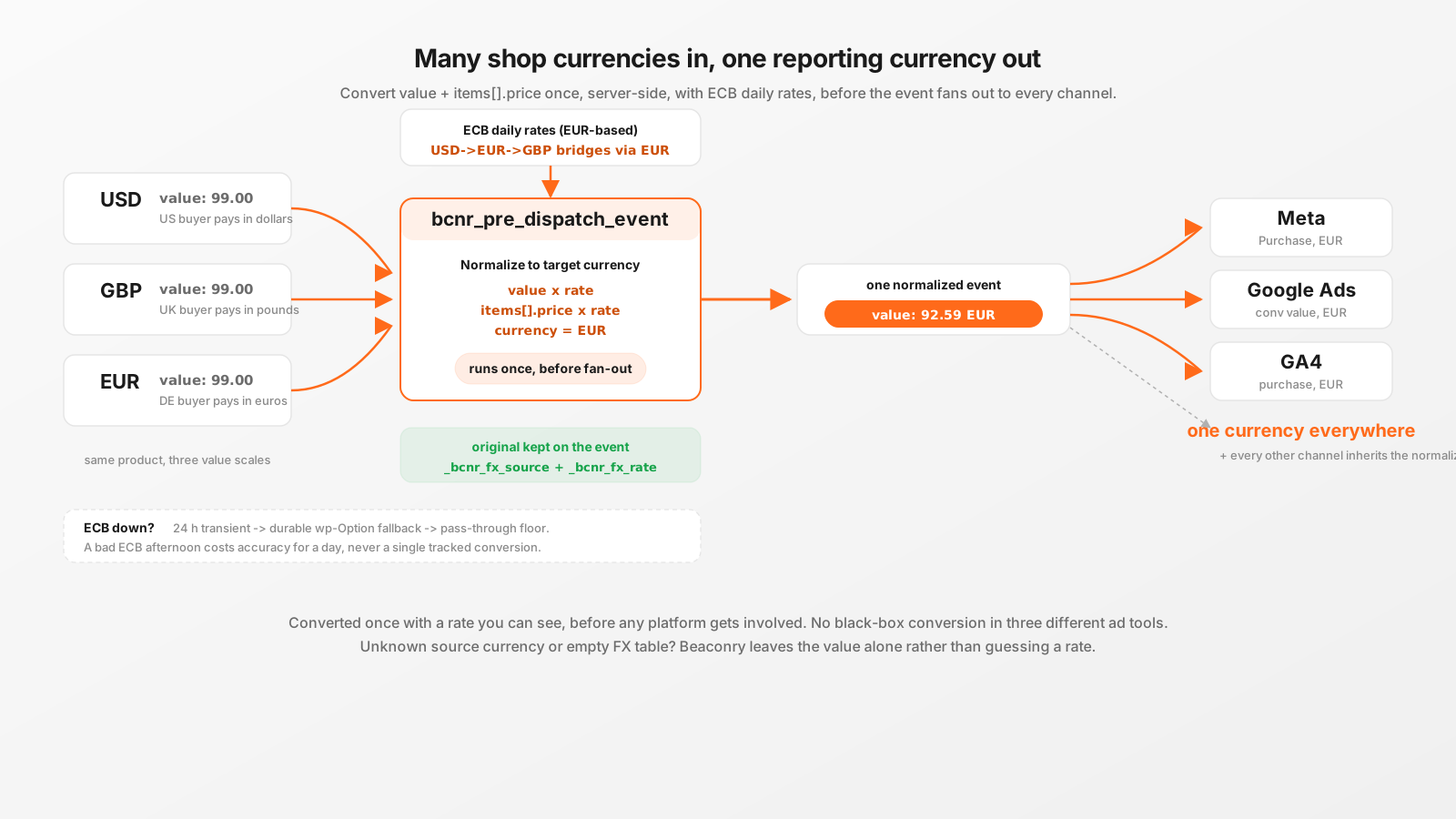
A shop that switches its prices into the visitor's local currency is good for conversion and terrible for reporting. The same product sells for 99 in three places and lands in your ad platforms as three different numbers. Beaconry rewrites value and every items[].price into one target currency before the event fans out, using European Central Bank daily rates, keeping the original currency on the event, and falling back to a durable cache when the ECB feed is down.
The problem: one product, three numbers
Multi-currency is now table stakes for any shop selling across borders. A WooCommerce store with a currency-switcher plugin, or a SureCart storefront that geolocates the visitor, shows a German buyer EUR, a UK buyer GBP, and a US buyer USD. Each checkout fires a purchase event with the price in whatever currency that buyer paid.
That is correct for the customer and broken for reporting. Three completed purchases of the same 99 product arrive at your ad platforms as:
- EUR buyer:
value: 99, currency: "EUR" - GBP buyer:
value: 99, currency: "GBP" - USD buyer:
value: 99, currency: "USD"
Some platforms convert internally for display, some do not, and the ones that do use their own rate at their own time, which you cannot see or audit. Worse, when a single campaign drives buyers across all three currencies, the platform's optimizer is told that one conversion is worth "99" in each, even though 99 GBP is roughly 1.18x the value of 99 EUR and 99 USD is roughly 0.93x. Your ROAS column mixes three value scales. Value-based bidding optimizes against noise.
The fix is to pick one reporting currency and convert every monetary field into it before the event leaves your server. That is exactly what Beaconry's Multi-Currency feature does, and because Beaconry dispatches server-side, the conversion happens in one place that feeds every channel identically.
Where it hooks: one filter, ahead of every channel
Beaconry fans a single canonical event out to up to ten server-side channels (GA4, Meta, TikTok, LinkedIn, Google Ads, Microsoft Ads, Pinterest, X Ads, Snapchat, Reddit). The fan-out lives in BCNR_Forwarder::dispatch(), and right before it splits the event per channel it runs one filter:
apply_filters( 'bcnr_pre_dispatch_event', $event )The Multi-Currency class registers a single listener on that filter:
// class-bcnr-currency.php
add_filter( 'bcnr_pre_dispatch_event', [ self::class, 'normalize_event' ], 10, 1 );
This placement is the whole point. The currency conversion happens once, before the event is copied into ten per-channel payloads. There is no per-channel currency code, no risk that Meta gets EUR while Google Ads gets the original USD. Every dispatch_*() method downstream reads the same already-normalized value, currency, and items[].price. Add an eleventh channel tomorrow and it inherits the normalized value for free, no currency code to write.
What gets rewritten, and what is left alone
The listener reads the customer's currency_target setting (a 3-letter ISO code, or the BCNR_CURRENCY_TARGET constant override) and rewrites three things on a monetary event:
$event['value'], multiplied by the source-to-target rate.- Every
$event['items'][n]['price'], the same multiplication per line item. The funnel events carry fullitems[]arrays (item_id, item_name, price, quantity), so per-item price has to move too or your GA4 item-level revenue would disagree with the event total. $event['currency'], set to the target so every downstream channel reports the same code.
It is deliberately conservative about when it does nothing. The event passes through completely unchanged in all of these cases:
- The feature is off (
currency_targetempty). Default state. - The event has no
value(apage_vieworview_item_listwith no price is not money and is not touched). - The source currency is missing, or already equals the target. No-op, except that a value-bearing event with an empty currency gets the target code stamped on so a downstream channel does not fall back to its own "EUR" default.
- The source currency is not in the ECB table (an exotic code), in which case Beaconry leaves the value alone rather than guessing a rate.
- The FX table is empty after a failed pull with no cached fallback. Pass-through plus an admin notice, never a crash.
"Leave it alone rather than guess" is the governing rule. A wrong rate silently corrupts revenue reporting in a way that is very hard to notice; an unconverted value is at least obviously in its original currency and self-explaining.
Where the rates come from: ECB, EUR-based
The rate source is the European Central Bank's daily reference feed, the same XML that half of European finance quietly runs on:
https://www.ecb.europa.eu/stats/eurofxref/eurofxref-daily.xmlIt is public, free, requires no API key, and publishes around 30 major currencies once per business day around 16:00 CET. Beaconry parses the <Cube currency="USD" rate="1.08"/> nodes into a flat table of [ 'USD' => 1.08, 'GBP' => 0.84, ... ].
One detail matters for correctness: ECB publishes EUR-to-X rates only. There is no direct USD-to-GBP figure in the feed. So a USD-to-GBP conversion bridges through EUR:
// USD -> EUR is 1 / rate[USD], then EUR -> GBP is x rate[GBP]
$to_eur   = ( $from === 'EUR' ) ? 1.0 : 1.0 / $rates[ $from ];
$from_eur = ( $to   === 'EUR' ) ? 1.0 : $rates[ $to ];
return $to_eur * $from_eur;
If either side is unknown the function returns 0.0, which the caller reads as "do not convert", and the event passes through untouched. Converted amounts are rounded to two decimals with PHP_ROUND_HALF_UP so a value like 1.005 rounds predictably instead of riding floating-point luck.
The target currency itself is validated against the live table before anything converts. EUR is always accepted (it is the ECB base). Anything else has to actually exist in the fetched rate set, so a fat-fingered currency_target of "USB" resolves to empty and the whole feature no-ops instead of breaking every purchase event.
The durable fallback: ECB outages do not stop dispatch
Conversion tracking that breaks when an upstream feed has a bad afternoon is worse than no normalization at all, because it takes the whole purchase event down with it. So the rate table has two layers of cache and a hard pass-through floor.
- Transient cache (24 h TTL). The happy path. The ECB feed is pulled at most once a day by the
bcnr_currency_refreshcron, parsed, and stored in thebcnr_fx_ratestransient. Every event during the day reads this with zero network cost. - Durable option fallback. The same parsed table is also written to an
autoload=falsewp-Option,bcnr_fx_rates_fallback. Transients can be evicted early by an aggressive object cache; this option cannot. If the transient is gone and the ECB pull fails, Beaconry serves the last good rates from this option and re-primes the transient for one hour so it does not hammer ECB on every event during an outage. - Empty-table floor. Only if there is no transient, no durable fallback, and the live pull fails (a brand-new install that has never once reached ECB) does the feature give up. It records a human-readable message in
bcnr_fx_last_error, surfaces it as an admin notice, and passes every event through in its original currency. Dispatch keeps running. Nobody loses a conversion.
The HTTP pull itself is defensive: a 5-second timeout, SSL verification on, a non-200 or empty body treated as failure, and the XML parsed with LIBXML_NONET so even the trusted ECB source cannot pull in an external entity. Any parse error returns an empty table, which routes straight into the fallback logic above.
The original currency is never thrown away
Normalizing in place would destroy information. If a German buyer paid 99 EUR and you only ever store "92.59 USD" you have lost the fact that the real transaction was in EUR. Beaconry keeps both. After a conversion it annotates the event with two internal fields:
$event['_bcnr_fx_source'] = $source; // e.g. 'USD'
$event['_bcnr_fx_rate']   = $rate;   // e.g. 0.9259
These two fields are the audit trail. The Live-Dashboard recent-events table can render "92.59 EUR (USD)" instead of a bare number, and the operational log can show the exact rate that was applied to a given event, so a revenue discrepancy is debuggable after the fact rather than a black box.
Crucially, the _bcnr_ prefix means these are internal-only fields. Every dispatch_*() method forwards only the documented keys its channel expects (the Meta content_* set, the GA4 items[] set, and so on). The _bcnr_fx_source and _bcnr_fx_rate annotations are read inside WordPress for display and logging, and stripped before anything goes on the wire. Meta never sees them, GA4 never sees them, they exist purely so a human can later answer "what rate did we apply to order 4815?".
What it actually cleans up across Meta, Google and GA4
Concretely, with currency_target set to EUR and a campaign that drove all three buyers from the top of this article:
- Meta receives three
Purchaseevents all readingvalue: ~92.59, currency: "EUR"(the GBP one at its own EUR equivalent, the EUR one unchanged). Thecontent_*per-item values line up with the event total becauseitems[].pricemoved with it. Value-based bidding and ROAS in Ads Manager now compare like with like. - Google Ads gets the same normalized value through the Conversions API, so the conversion-value column in Google Ads is in one currency, not silently mixing three that Google then re-converts on its own schedule.
- GA4 records every
purchasein EUR, which means the Monetization reports sum correctly without you setting up a currency conversion in GA4's own settings (and without the rounding GA4 applies when it converts for you). Item-level revenue in GA4 matches the event revenue because both were converted by the same rate at the same instant.
The shared property across all three is that the value was converted once, server-side, with a rate you can see, before any platform got involved. You are no longer trusting three different black-box conversions; you are sending three platforms one consistent number and keeping the receipt.
Turning it on
Default off. Opt in from the Multi-Currency card on the Advanced tab, or set the constant in wp-config.php for a power-user override:
define( 'BCNR_CURRENCY_TARGET', 'EUR' );Pick the currency you actually report and bid in, which is usually your accounting currency, not necessarily your most common checkout currency. After that there is nothing per-channel to configure. The daily cron keeps the rate table warm, the durable fallback covers ECB's bad days, and every monetary event from WooCommerce, EDD or SureCart lands in your ad platforms in one currency.
To verify: complete a test purchase in a non-target currency and check the Live-Dashboard recent-events table. A normalized event renders the target value with the source currency in parentheses, for example "92.59 EUR (USD)". If you see the original currency unchanged, check the admin notice area for the ECB fallback message, and confirm your currency_target is a code that actually appears in the ECB feed.
Take-away
Multi-currency shops do not have a pricing problem, they have a reporting problem: the same product reaches your ad platforms as several incompatible numbers. Beaconry solves it at the one place that feeds every channel, the bcnr_pre_dispatch_event filter, by converting value and every items[].price into one target currency with ECB daily rates, before fan-out. It keeps the original currency and the applied rate on the event so the math is auditable, it bridges cross-currency pairs through EUR because that is all ECB publishes, and it has a two-layer cache with a hard pass-through floor so an ECB outage costs you accuracy for a day, never a single tracked conversion. One reporting currency, one rate you can see, no black-box conversions in three different platforms.