
Microsoft Ads conversions without the developer-token wait
Microsoft's OfflineConversions API gates production conversion uploads behind a developer-token review, the same multi-week friction the Google Ads API has. Beaconry routes Microsoft through the same central broker, so you connect with OAuth and start uploading the same day. This is the architecture: msclkid attribution, the goal-name addressing model, the two account IDs every upload needs, and why Bing carries more B2B spend than its market-share suggests.
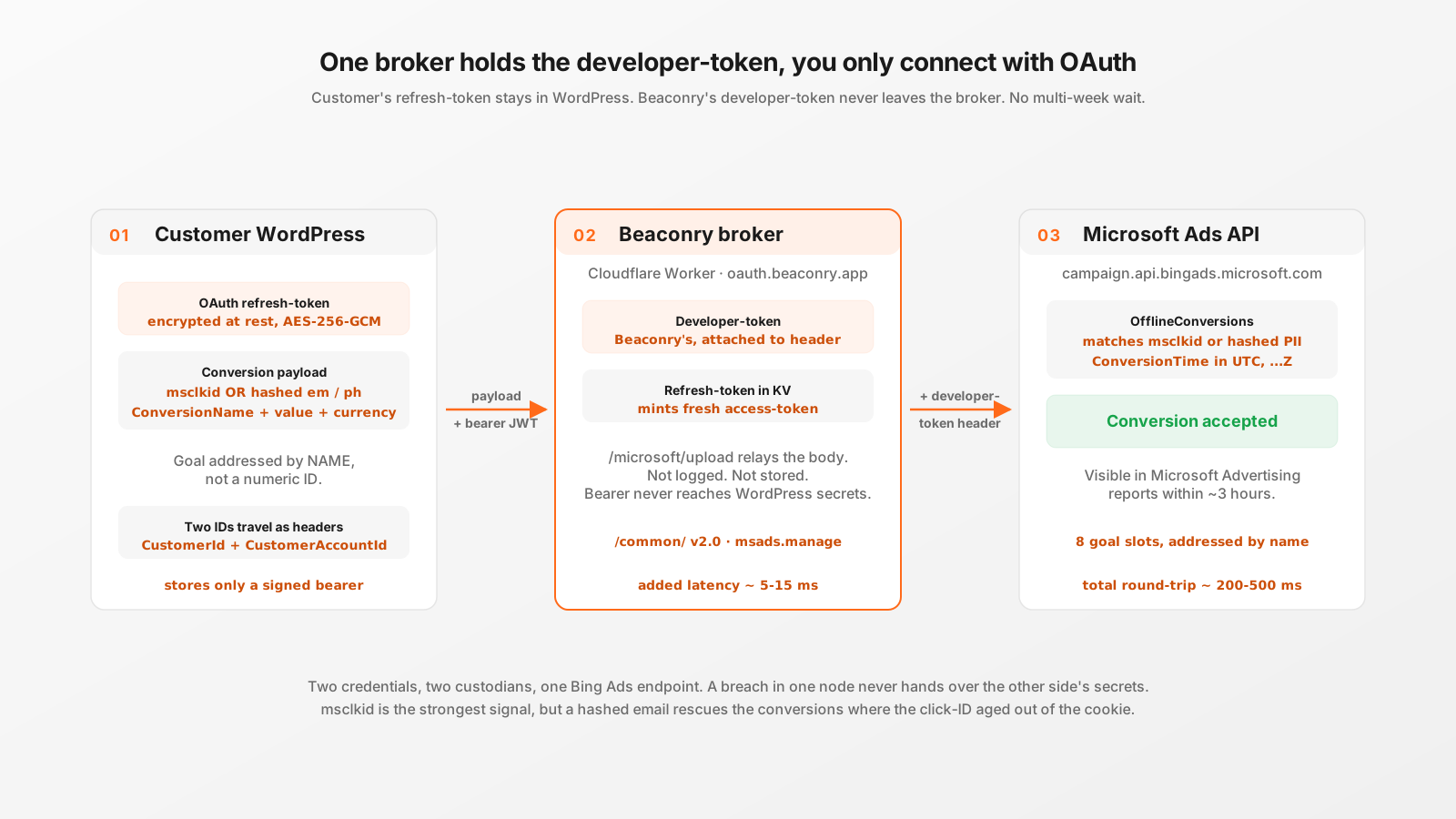
The same gate Google Ads has, one vendor over
If you have read the Google Ads developer-token post, the shape of this problem is familiar. Authenticating against the Microsoft Advertising Conversions API needs two separate credentials, and they live on opposite sides of the friction line.
- A developer-token. This belongs to whoever wrote the integration. It identifies the application to Microsoft, gates API quota, and is the thing Microsoft reviews when you apply for production access. One token per integration, no matter how many ad-accounts use it.
- An OAuth credential. This belongs to each individual ad-account holder. It says which Microsoft account is uploading and to which Customer ID. Issued in seconds through the standard OAuth handshake, no review queue.
The OAuth side is instant. The developer-token side is a written application to Microsoft describing your use-case, your data handling, and your integration, followed by reviewer back-and-forth. The realistic window is in the same multi-week range as Google's. For a small WordPress shop that just wants Bing conversions in its reports, that is a month-plus pause before the first conversion can be uploaded.
Beaconry's answer is the same one it uses for Google Ads: a central Cloudflare Worker (the broker) holds Beaconry's own approved developer-token, and the customer install never sees it. The customer only completes OAuth. That is the entire idea. The rest of this post is about the parts of the Microsoft pipeline that are not a copy of Google, because that is where the implementation details actually live.
Where Microsoft differs from Google in the wire
The broker pattern is shared, but the Microsoft API has four concrete differences that the dispatcher has to handle. Each one is a place a naive "just clone the Google path" port would silently break.
1. msclkid, not gclid
Google's click identifier is gclid. Microsoft's is msclkid (Microsoft Click ID). It arrives the same way, as a URL parameter on the landing page when a visitor clicks a Microsoft ad, and Beaconry's nl-data engine captures it on landing and persists it in the first-party nl_ext cookie alongside every other click-ID it tracks. Server-side, the read order is the live request's ?msclkid= parameter first, then the nl_ext cookie:
public static function get_msclkid(): string {
    if ( ! empty( $_GET['msclkid'] ) ) {
        $id = sanitize_text_field( wp_unslash( (string) $_GET['msclkid'] ) );
        if ( $id !== '' ) {
            return $id;
        }
    }
    // ... fall back to the nl_ext cookie's persisted msclkid
}
That ordering matters: the URL parameter is the freshest signal (the visitor is on the ad-landing page right now), and the cookie is the durable fallback for conversions that happen on a later page-view in the same session.
2. Conversions are addressed by goal NAME, not a numeric ID
This is the difference that actually makes Microsoft easier to configure than Google. In the Google Ads path you map each event to a numeric ConversionAction-ID, an opaque number you copy out of the Google Ads UI. Microsoft addresses conversions by their ConversionName: the human-readable goal name you typed into the Bing Ads UI under "Conversion goals". So instead of pasting 1234567890 per slot, you type Purchase or Newsletter signup, exactly as it appears in Microsoft Advertising. The string travels on the wire as ConversionName and Microsoft matches it server-side.
The trade-off: a goal-name typo fails silently. There is no numeric ID to validate against, so if the name in Beaconry does not match the name in the Bing Ads UI character-for-character, Microsoft accepts the upload and quietly attributes it to nothing. The fix is operational, not architectural: copy the name, do not retype it.
3. Two account IDs per upload, not one
Google needs a single Customer ID per upload. Microsoft needs two: a CustomerId and a CustomerAccountId. The first identifies the customer (the manager-level entity), the second identifies the specific ad-account underneath it. Both are 6-to-12-digit numerics, both are sent as headers by the broker on every upload, and a dispatch is not "ready" until both are stored:
public static function is_dispatch_ready(): bool {
    return self::is_connected()
        && (string) BCNR_Settings::get( 'microsoft_ads_customer_id' ) !== ''
        && (string) BCNR_Settings::get( 'microsoft_ads_account_id' )  !== '';
}
Microsoft has no separate login_customer_id concept the way Google Ads does for manager-account (MCC) scenarios. The CustomerId carries that role directly, which is one fewer field to reason about even though it is one more ID than Google overall.
4. No documented refresh-token revoke
Google exposes a token-revoke endpoint, so disconnecting hard-kills the grant immediately. Microsoft does not publish an equivalent. Beaconry's disconnect therefore does the most it can: it POSTs /microsoft/disconnect so the broker wipes its stored refresh-token from KV, then drops the locally stored bearer and all the ID and goal config in WordPress. Microsoft itself expires the refresh-token server-side after 90 days of inactivity. A customer who wants the grant gone right now can revoke Beaconry's app from account.microsoft.com/privacy/app-access, which kills the AAD session on Microsoft's side. The plugin's disconnect copy points there for exactly that reason.
The eight conversion-goal slots
Beaconry maps a fixed set of canonical events to Microsoft conversion goals. There are eight slots, and each slot value is the ConversionName string you configured in the Bing Ads UI:
public const GOAL_SLOTS = [
    'purchase',
    'add_to_cart',
    'begin_checkout',
    'lead',
    'subscribe',
    'schedule',
    'signup',
    'contact',
];
That is purchase, add_to_cart, begin_checkout, lead, subscribe, schedule, signup, and contact. The commerce four (purchase, add_to_cart, begin_checkout, plus the implied funnel they sit in) cover a WooCommerce or EDD store; the other four (lead, subscribe, schedule, signup, contact) cover the B2B and SaaS funnels where Microsoft Ads actually earns its keep. You fill in only the slots you have goals for. An event whose slot has no goal name set is treated as "not wanted on this channel" and silently skipped, so a lead-gen site that never sells a product simply leaves the commerce slots blank.
The slot set is deliberately the same shape as the Google Ads label slots, so the forwarder can fan a single canonical event out to both providers from one map without per-vendor branching.
The attribution fallback: msclkid OR hashed PII
Here is the part of the dispatcher that earns the most real-world conversions. Microsoft's OfflineConversions endpoint wants a MicrosoftClickId to attribute a conversion back to the ad that drove it. But msclkid is a cookie value, and cookie values do not survive forever: a multi-day path, a browser-storage cleanup, or a different device between click and purchase can lose it. If msclkid were strictly required, every one of those longer-window conversions would be dropped.
Microsoft's own OfflineConversion data-object spec makes MicrosoftClickId optional when a hashed email or hashed phone is supplied instead, feeding their enhanced-conversions matching pipeline. Beaconry implements exactly that fallback. The upload proceeds if it has either a click-ID or at least one hashed match key, and is skipped only when it has neither:
$msclkid     = (string) ( $event['msclkid'] ?? '' );
$user        = (array)  ( $event['user_data'] ?? [] );
$has_user_id = ! empty( $user['em'] ) || ! empty( $user['ph'] );

if ( $msclkid === '' && ! $has_user_id ) {
    return; // nothing to attribute on, silent skip
}
So a WooCommerce purchase where the visitor's msclkid was lost three days after the ad click still uploads, because the checkout handed Beaconry a hashed email. The click-ID is the strongest single signal, but it is not the only one, and the dispatcher refuses to throw away a perfectly attributable conversion just because the cookie aged out.
What actually goes on the wire
The OfflineConversion object Beaconry assembles is a tight subset of Microsoft's schema. Every field maps to a documented schema key, and fields that are empty are stripped before sending so the API never sees a blank HashedEmailAddress or an empty MicrosoftClickId:
$conversion = array_filter( [
    'ConversionName'         => $goal_name,
    'ConversionTime'         => gmdate( 'Y-m-d\TH:i:s\Z', $ts ),
    'ConversionValue'        => $value,
    'ConversionCurrencyCode' => strtoupper( $currency ),
    'MicrosoftClickId'       => $msclkid,
    'HashedEmailAddress'     => $user['em'] ?? '',
    'HashedPhoneNumber'      => $user['ph'] ?? '',
], /* drop empty + null */ );
Two details that came out of reading Microsoft's spec rather than guessing from the Google path:
- ConversionTime is ISO 8601 with an explicit UTC marker. The format is
yyyy-mm-ddThh:mm:ssZ, generated withgmdate(...'Z')so it is unambiguously UTC. A naive local-time string here would put conversions in the wrong attribution window. - TransactionId is NOT in the OfflineConversion schema. An early version of the dispatcher carried one over from habit; Microsoft either drops unknown fields or rejects them, so it was removed. The order-level idempotency that TransactionId would have provided is handled upstream by Beaconry's stable per-order
event_idinstead, before the event ever reaches the Microsoft dispatcher.
The currency is upper-cased, the value is a float, and the whole object goes through array_filter so the wire payload contains only the keys that have real data.
The upload path, end to end
Putting the broker and the dispatcher together, a single Microsoft conversion upload runs like this:
- A funnel event fires server-side (a WooCommerce purchase hook, a form-submit, an EDD sale). The forwarder routes it to the Microsoft channel with one of the eight goal kinds.
- The dispatcher checks
is_dispatch_ready()(bearer + both IDs stored), looks up the ConversionName for that goal kind, and bails silently if either is missing. - It checks the attribution fallback: msclkid or hashed em/ph, else skip.
- It builds the OfflineConversion object above and POSTs it to the broker's
/microsoft/uploadroute with the site's HMAC-signed bearer in the Authorization header. - The broker reads the stored refresh-token for that site, mints a fresh Microsoft access-token, attaches the central developer-token plus the per-call CustomerId and CustomerAccountId headers, and relays to
campaign.api.bingads.microsoft.com. - The call is fire-and-forget:
blocking => false, so the originating browser request (the checkout, the form submit) returns immediately. Outcomes surface in the broker's/microsoft/quotacounter, which the status dashboard reads.
The customer's WordPress holds only the bearer JWT, the two numeric account IDs, and the goal-name strings. Every actual secret, the Microsoft OAuth client secret, the developer token, the refresh and access tokens, lives in the broker's Wrangler-secret store and its KV, keyed by an opaque site_id baked into the bearer. The OAuth flow itself runs through Microsoft's /common/ v2.0 endpoint with the msads.manage offline_access scope, so both work-or-school AAD accounts and personal Microsoft accounts (which is what most Bing Ads customers use) can connect without being forced through a specific tenant.
Why Bing carries B2B spend out of proportion to its market share
It is tempting to skip Microsoft Ads because Bing's overall search share looks small next to Google. That reasoning misreads who is actually on Bing. Microsoft Search is the default in a very specific and very valuable place: the Office 365 and Microsoft 365 install base, Edge on managed Windows 11 fleets, and corporate desktops where IT never changed the default. That population skews heavily toward business decision-makers, procurement, and SaaS buyers spending on a company card.
The practical consequences for a B2B or SaaS advertiser:
- Disproportionate B2B reach. For business-led campaigns, Microsoft Ads commonly captures a slice of paid traffic well above what raw search-share implies, because the audience composition is exactly the high-intent business segment.
- Lower competition, often lower CPAs. Fewer advertisers bid on Bing than on Google, so the same keyword can clear at a lower cost-per-acquisition. That only shows up in your reporting if the conversions are actually being uploaded, which is the whole point of getting the API working.
- Search-partner syndication is free reach. Microsoft Ads also serves on Yahoo, Ecosia, and DuckDuckGo through search-syndication partnerships. Conversions from those partner clicks carry msclkid the same way, so no special handling is needed in the dispatcher.
A LinkedIn note, because the ownership confuses people: Microsoft owns LinkedIn, but Microsoft Ads and the LinkedIn Conversions API are two separate platforms with two separate slots in Beaconry. Owning both does not merge them. If you run campaigns on both, you configure both; events flow to whichever is wired up.
Take-away
Microsoft Ads has the same developer-token gate as Google Ads, and Beaconry skips it the same way: a central broker holds the approved token, you connect with OAuth, you upload the same day. The parts worth knowing are the differences, msclkid instead of gclid, conversion goals addressed by name instead of a numeric ID, two account IDs per upload instead of one, and a click-ID-or-hashed-PII attribution fallback that rescues the longer-window conversions a strict msclkid rule would drop. None of that compromises the privacy split: the customer's refresh-token never leaves WordPress, Beaconry's developer-token never leaves the broker. And for a B2B or SaaS shop, the channel is worth the wiring, because Bing's audience carries more business intent than its market-share would ever suggest.