
Meta CAPI Match Quality: why "Poor" and how to get to "Good"
Match Quality is Meta's diagnostic for how well your Conversions API events are tied to actual people. It runs from Poor to Great. Four stages, four different fixes. Here's how to read it and what to change at each step.
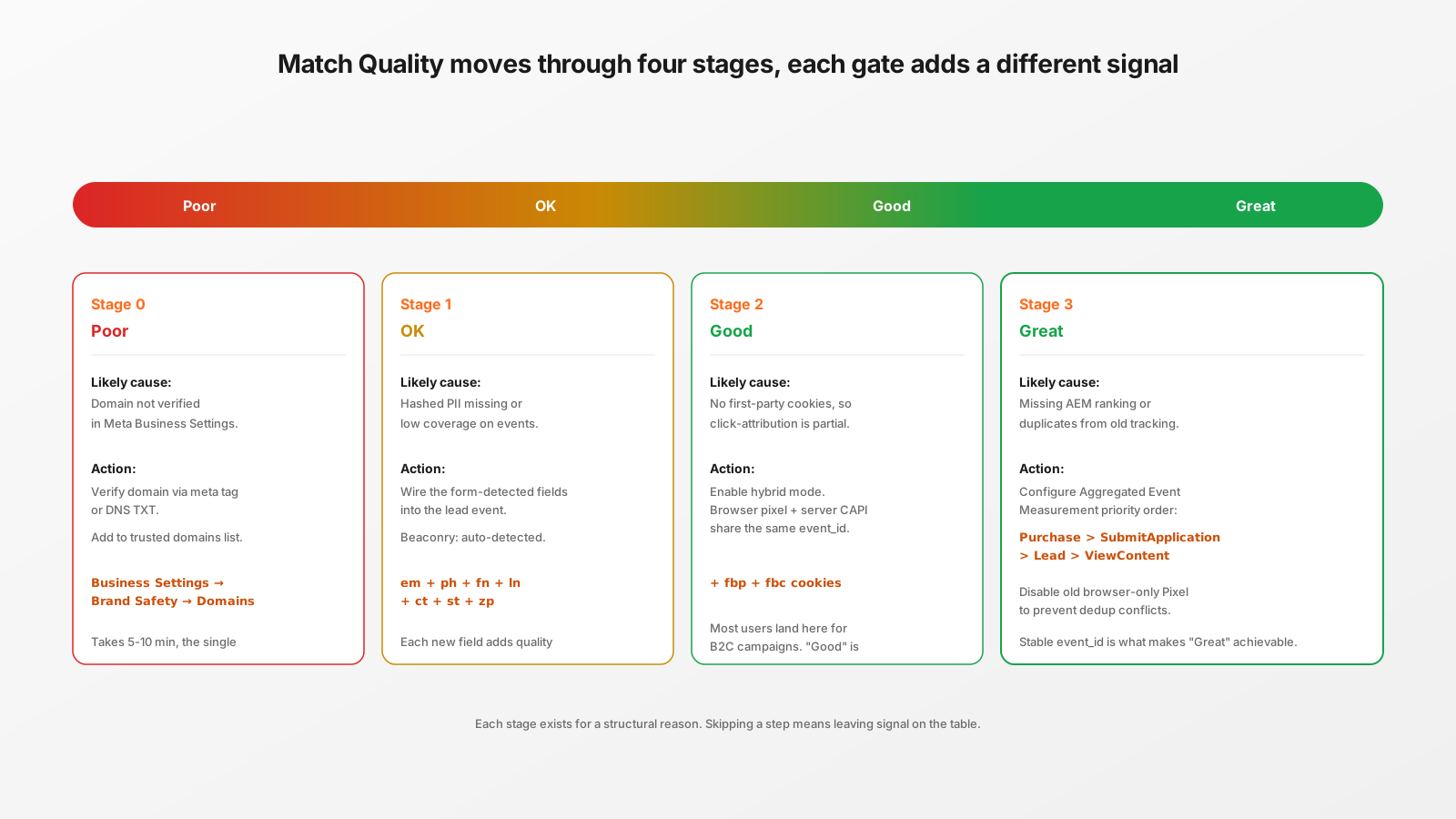
Where Match Quality lives
Open Events Manager, pick your Pixel, go to Settings → Diagnostics. Below the EMQ score Meta shows a Match Quality reading per event-type, computed over the last 7 days of events received via CAPI. Possible values: Poor, OK, Good, Great. The score is updated daily. Each stage corresponds to a different bottleneck.
Stage 0: Poor
The most common reason for "Poor" is that the events arrive but Meta cannot tie them to your verified domain. Either the domain isn't verified in Business Settings, or the verification was done on the apex but events fire from www. (or vice versa).
Action: Business Settings → Brand Safety → Domains. Add the exact origin events fire from (look at Events Manager → Test Events to see what origin Meta sees). Verify via meta-tag (fastest) or DNS TXT record. Once verified, add the domain to the Pixel's trusted domains list under Pixel → Settings → Traffic Permissions.
This single change can move you from Poor to OK in 24 hours, before you touch anything in Beaconry. It's the most common cause of "Poor" we see on customer setups.
Stage 1: OK
Domain is verified, events are landing, Meta is just not seeing enough matchable fields per event. Beaconry sends seven hashed PII fields out of the box on form submissions: email, phone, first name, last name, city, state, zip. If you see "OK" with form-driven leads, one or more of those fields isn't being captured by the form plugin.
Action: open Beaconry → Logs, filter by Meta, click into a recent generate_lead entry. Look at the request body. Each user_data field that's missing represents a form field your visitors didn't complete or didn't have. Add the missing fields to your form, or accept that the audience structurally doesn't have them (some B2B forms have email + phone but no zip, that's fine).
For purchase events from WooCommerce, the seven fields come from the order's billing address, which is always complete. WooCommerce purchase events should hit "Good" or "Great" without extra work. If they're "OK", check that you don't have a stale Beaconry version that hasn't been updated to send the city / state fields (older versions only sent four fields).
Stage 2: Good
This is where most B2C customers stabilise. Meta has the hashed PII, knows the domain, can match the conversion to a Meta user. What it doesn't have is a first-party cookie tying the visitor's browser session to the Meta user, which is needed for the highest-quality match band.
Action: enable hybrid mode for Meta in Beaconry. The browser pixel loads alongside the server-side dispatch, both fire with the same stable event_id, Meta merges them within a 48-hour dedup window. Browser side adds fbp + fbc first-party cookies. Server side adds the hashed PII. Meta picks the richer signal.
Trade-off: hybrid mode is +30 KB per page-view in additional JavaScript, plus the browser pixel is itself blocked by adblockers (which is fine, since the server-side path catches those anyway). Disable hybrid for adblock-heavy audiences (B2B, dev), enable for retail mainstream.
Stage 3: Great
"Great" is the band where your CAPI signal is strong enough that Meta's optimisation algorithms can confidently bid on similar audiences. The remaining gap from Good to Great is usually one of:
- Aggregated Event Measurement priorities. Meta requires you to rank up to 8 conversion events per verified domain in priority order. If priorities aren't set, Meta picks defaults that often don't match your funnel. Set them: Purchase > SubmitApplication > Lead > ViewContent > AddToCart > InitiateCheckout. Pixel → Settings → Aggregated Event Measurement.
- Duplicates from old tracking. If you used the Meta Pixel browser-only before Beaconry and didn't remove it, you're now sending the same event twice. With matching event_ids, Meta dedupes correctly. Without (which is the case if the old Pixel wasn't event_id-aware), you're inflating volume and degrading match-quality. Action: remove the old Pixel snippet from your site.
- External_id field. If you have a stable customer-ID across visits (logged-in users), pass it as
external_idin the event payload. Beaconry does this automatically for WooCommerce when the customer has an account. For anonymous purchasers, there's no external_id; that's normal.
What "Great" actually means in campaign performance
Match Quality is a proxy for how confidently Meta's algorithms can model your audience. Concretely:
- Poor → Meta can't reliably build a lookalike audience from your conversions. CPA drifts up over campaign lifetime.
- OK → Lookalikes work but with high variance. Smart-Bidding takes longer to stabilise.
- Good → Standard B2C performance. Lookalikes work, retargeting works, CPC is predictable.
- Great → Meta's machine-learning has high confidence per event. Smart-Bidding stabilises faster, lookalike audiences perform within ~10 % of seed-list ROAS.
The cost of moving from Good to Great is usually one afternoon of work in Meta's UI plus toggling hybrid mode. The lift on a campaign running at €5,000/month is often €500-1,500 in recovered conversions per month.
What Match Quality is not
- It's not the same as Event Match Quality (EMQ) shown next to it. EMQ is the legacy version, less granular, scored 1-10. Match Quality is the newer per-event-type metric. Read both, prioritise Match Quality.
- It's not iOS-attribution-coverage. Match Quality reflects everything Meta sees, including iOS-restricted conversions. iOS coverage is reported separately under SKAd.
- It's not Pixel health. Pixel health is "did events arrive". Match Quality is "could Meta do something useful with them once they arrived".
How long does each stage take to update?
Match Quality is computed over a rolling 7-day window. Changes you make today show up in the metric over 1-3 days as old events drop off. Don't make a change at noon and refresh the page expecting a new number; come back 48 hours later. If you make changes Friday afternoon, the visible improvement is Tuesday/Wednesday at earliest.
Take-away
Match Quality is the most useful single diagnostic Meta gives you for a CAPI setup. Read it weekly, treat each stage as a different problem, fix the highest-leverage one first (domain verification → PII coverage → hybrid mode → AEM priorities). Beaconry handles the data side; the configuration side lives in Meta's UI and doesn't change between tracking tools.