
A live conversion dashboard inside WP-Admin
Server-side tracking moves the dispatch into PHP, which is great for adblock-immunity and terrible for visibility. You cannot open DevTools and watch a server-to-server POST. So Beaconry records what it sends into two compact stores inside your own database, scores each channel 0 to 10, and mails you the moment a channel's volume collapses or explodes. The goal is simple: hear about a broken pixel from your own WP-Admin, not from a Meta rep two days into a wasted campaign.
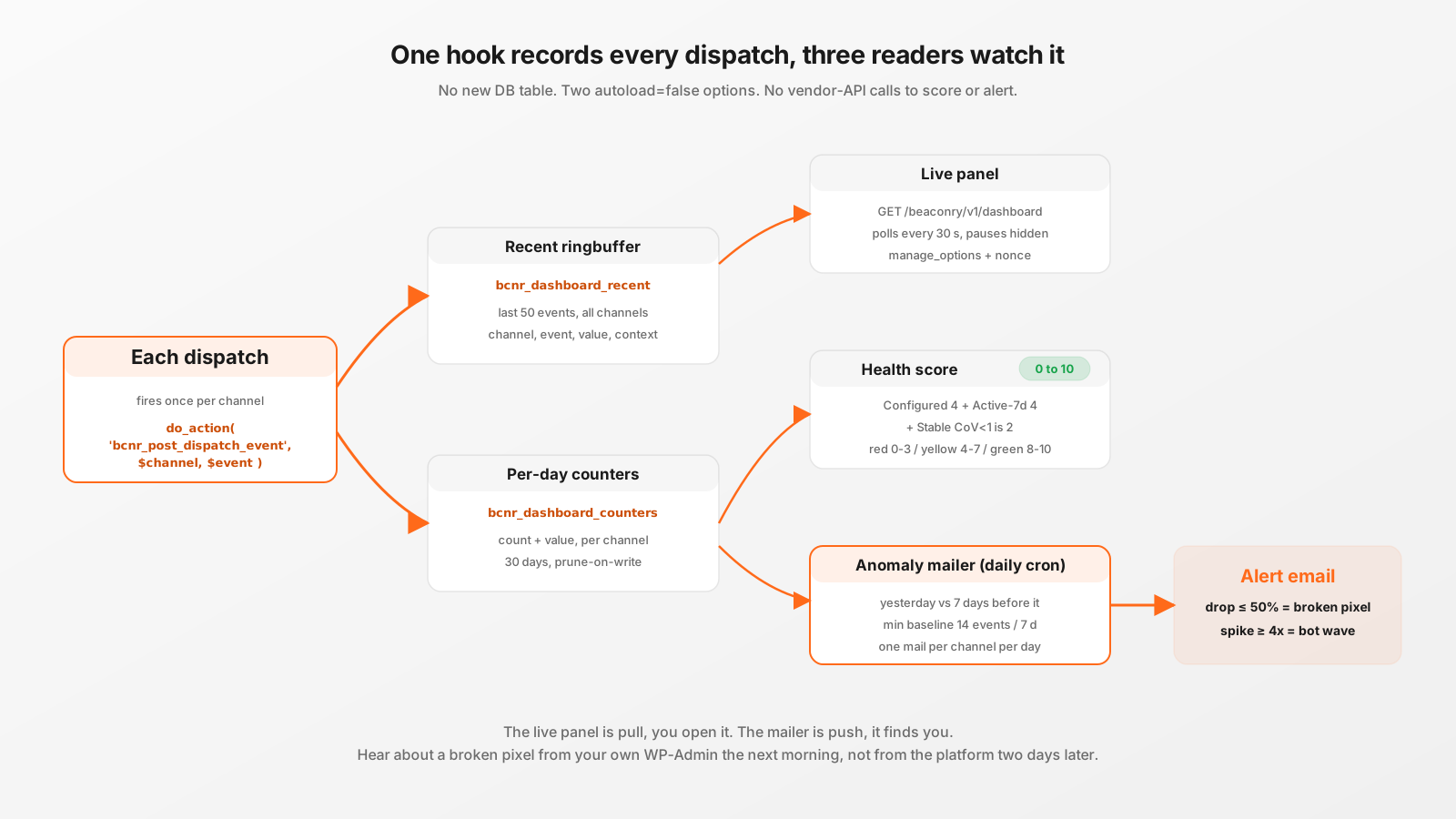
The visibility hole server-side opens
With a browser pixel, debugging is a Network-tab away. You click buy, you watch the request to the platform fire, you read the payload, you see the 200 come back. Move the dispatch server-side and that window closes. The conversion now leaves your WordPress install as a background wp_remote_post with blocking => false, so even the originating PHP process does not wait for the response. The visitor's browser already returned. Nothing in the browser ever talked to the platform.
That is exactly the property you bought server-side for. It is also why a broken pixel can go unnoticed for days. If a vendor quietly stops accepting your events, or a token expires, or a caching layer eats the consent cookie so the REST endpoint never gets called, the only visible symptom is "conversions in the platform went to zero", and you tend to discover that when someone asks why the campaign stopped optimizing. Beaconry's answer is to record what it dispatches, where you can see it, and to alert you when the volume stops looking normal.
What gets recorded, and where
There is a single hook that fires once per channel, right after each channel's dispatch call returns:
do_action( 'bcnr_post_dispatch_event', $channel, $event );An event that fans out to GA4 and Meta fires this twice, once per channel, which is the correct unit: "how many conversions did Meta see today" is a per-channel question. BCNR_Dashboard_Stats listens on that action and writes two structures into autoload=false wp-options. No new database table, two update_option calls per dispatched event:
- The recent ringbuffer (
bcnr_dashboard_recent): the last 50 events across all channels. Each entry holds the timestamp, the channel, the event name as actually sent to the vendor (so a Meta hybrid mapping showsViewContent, not the internal GA4 name), the value and currency, the original currency if Multi-Currency rewrote it, and a context string. - The per-channel-per-day counters (
bcnr_dashboard_counters): a count and a value-sum per channel per day, kept for 30 days with prune-on-write so the option never grows unbounded. This is the series the cards, the sparklines, the health score and the anomaly mailer all read from.
The context string is what makes the Latest-conversions table readable instead of a wall of "page_view". Beaconry resolves it in priority order: a form label wins (set by the forms layer), then an order number for a WooCommerce / EDD / SureCart purchase (rendered as #1482), and otherwise the page path the event came from. At a glance you can tell a purchase on #1482 apart from a lead off the contact form apart from a pageview on /pricing/.
This is a deliberate, documented compromise on the original "no DB writes per event" rule. The justification is the traffic profile: a real Beaconry install sits well under a thousand events per hour, both options are excluded from the autoloaded bundle so they never touch a normal page-load, and a second migration for a dashboard table was not worth the cost. Two option writes per event buys the entire observability surface.
The Latest-conversions panel
The Dashboard tab reads a single admin-only REST route:
GET /wp-json/beaconry/v1/dashboard?range=today|7d|30dIt requires the manage_options capability and a valid wp_rest nonce sent as X-WP-Nonce, so the snapshot is never exposed to a logged-out visitor. The card's vanilla JS polls it every 30 seconds and pauses on visibilitychange, so a backgrounded admin tab is not hammering the endpoint. There is no jQuery, no framework, no third-party charting library: the sparklines are the per-day counts the snapshot already carries.
The panel answers the question DevTools used to answer for the browser pixel: "is the thing I configured actually firing, right now, with the values I expect?" You watch a test purchase land in the table within a poll cycle, you confirm the value and currency are right, you confirm it fanned out to every channel you switched on. If Multi-Currency is active you see the conversion as 92.59 EUR (USD), the normalized value with the original currency annotated, so you can verify the ECB rate did what you wanted.
The 0-10 health score
Each channel card carries a health score, and the important thing to understand is what it is not. It is not a vendor metric. It makes zero extra API calls. It is computed entirely from the same in-WordPress counter table, which is why it is cheap enough to compute on every snapshot. BCNR_Health_Score::for_channel() sums three weighted components to a 0-10 integer:
- Configured (4 points): does the channel have credentials wired up? This reads through the exact same
has_*()gates the dispatcher uses, so the score can never disagree with the live configuration display. An unconfigured channel is not "broken", it is just unfinished, and the score reflects that you said you wanted it and have not completed setup. - Active in the last 7 days (4 points): at least one dispatched event in the trailing week. This is the single most useful signal. A configured channel that has been silent for seven days is the classic shape of a broken pixel or a token the vendor quietly stopped honoring, the kind of failure the token health-probe does not always catch because the credential still looks valid.
- Stable (2 points): the coefficient of variation of the 7-day counts is below 1.0. CoV is the standard deviation divided by the mean. Below 1 means the day-to-day volume is reasonably even; above 1 means single days dominate the series, which is the signature of intermittent breakage (a caching layer that drops events on cache-miss days, a consent banner firing inconsistently).
The score buckets into a colored dot via tier(): 0 to 3 is red (broken or unconfigured), 4 to 7 is yellow (works but has issues), 8 to 10 is green (healthy). A configured channel firing steady daily volume lands at 10. A configured channel that went silent drops to 4, red-adjacent, which is the warning you want before the campaign starves.
There is a second, simpler indicator next to the score: a freshness status dot driven by how stale the last event is. Green for an event inside 24 hours, yellow for 24 to 72 hours, red for older than 72 hours or never. The score answers "is this channel structurally healthy over a week"; the status dot answers "did anything arrive recently". They are deliberately separate signals, and a low-traffic channel can legitimately show a yellow status dot without a bad score.
The anomaly mailer: drop means broken, spike means bots
The dashboard is pull. You have to open it. The anomaly mailer is push, and it is the part that earns its keep, because nobody opens the dashboard at 7am on a Sunday when the pixel breaks. A daily cron (bcnr_anomaly_check) reads the per-channel counters and judges yesterday against a rolling baseline. No network calls; it is pure arithmetic over data already in the database, which is why folding it into the token health-probe would have been the wrong design. Token-green plus volume-red is precisely the pixel-broken-on-the-frontend pattern a token probe cannot see.
The math is deliberately boring so it is predictable:
- Baseline: the sum of the seven days before yesterday (days 2 through 8 back), divided by 7. Yesterday itself is excluded from its own baseline so a crash does not drag down the line it is being measured against.
- Drop: yesterday's count is at or below 50 % of that average. A halving of normal volume. This is the broken-pixel alarm: pixel blocked or removed, token expired, tag deployed wrong.
- Spike: yesterday's count is at or above 4x the average. A quadrupling. This is the bot-or-spam alarm: a scripted form-submission exploit, a bot wave, or, occasionally, a genuine viral moment (great if it is, and the mail says so).
- Minimum baseline: a channel needs at least 14 events across the 7-day window before it is judged at all. This is what stops a couple of test conversions from tripping a false alarm on a channel that barely fires.
When a channel crosses a threshold, Beaconry mails the same alert recipient the token health-check uses. The mail names the channel, yesterday's count, the baseline average, and the percentage off normal, then lists the likely causes for that direction (a drop mail talks about blocked pixels and expired tokens; a spike mail talks about bots and points you at the Latest-conversions table to inspect the event types and source context). A per-channel-per-day transient gate (TTL 23 hours, a hair under the daily interval so the next day is never blocked) guarantees you get at most one mail per channel per day, not a storm.
All three thresholds are filterable for power users: bcnr_anomaly_drop_ratio, bcnr_anomaly_spike_ratio and bcnr_anomaly_min_baseline. A high-volume store that wants to be alerted on a gentler 30 % dip can dial the drop ratio without touching plugin code.
Why "two days later" is the whole point
The failure mode this design targets is latency of discovery, not the failure itself. Pixels break. Tokens expire. A theme update re-orders the consent script and the REST endpoint stops getting called. Those happen regardless of which tracking tool you run. What differs is how long the gap between "it broke" and "you found out" lasts.
Without an in-house signal, the discovery path is: the pixel breaks, conversions stop arriving at the platform, the platform's optimizer slowly loses its signal, the campaign drifts, and somewhere on day two or three a human notices the numbers and starts asking questions. With the counters plus the mailer, the discovery path is: the pixel breaks, today's count lands at zero, the next morning's cron sees yesterday at zero against a healthy baseline, and you get an email naming the channel before the campaign has had time to drift. Same break, very different bill.
It is worth being honest about the resolution. This is a daily cron comparing whole-day counts, so the tightest detection window is "the morning after". It is not a real-time pager. For a tracking pipeline that feeds ad-platform optimizers, next-morning is the right altitude: platforms aggregate and attribute over days anyway, so catching a zero-day before it becomes a zero-week is what actually protects the spend. If you want a real-time confirmation that a specific channel is firing this minute, that is what the live panel and the End-to-End-Test button are for; the mailer's job is the unattended early warning.
Take-away
Server-side tracking trades browser visibility for adblock-immunity, and the dashboard buys the visibility back without giving up the immunity. Two autoload=false options record every dispatch (a last-50 ringbuffer for the live table, 30 days of per-channel counters for everything else). A 0-10 score built from Configured, Active-7d and Stable, with no vendor calls, tells you which channels are structurally healthy. A daily cron mails you on a 50 % drop (broken) or a 4x spike (bots), measured against the seven days before yesterday, gated to one mail per channel per day. None of it is a real-time pager, and it is not trying to be. It is the early-warning layer that turns "we found out two days later from the platform" into "Beaconry emailed us the next morning".