
Google Ads developer-token approval: the 6-week wait, and how to skip it
Server-side conversion uploads via the Google Ads API require a developer-token. Approval takes 4 to 6 weeks of back-and-forth with Google. A central broker abstracts the token without ever seeing your conversion data, here's how the architecture is wired and why it doesn't compromise privacy.
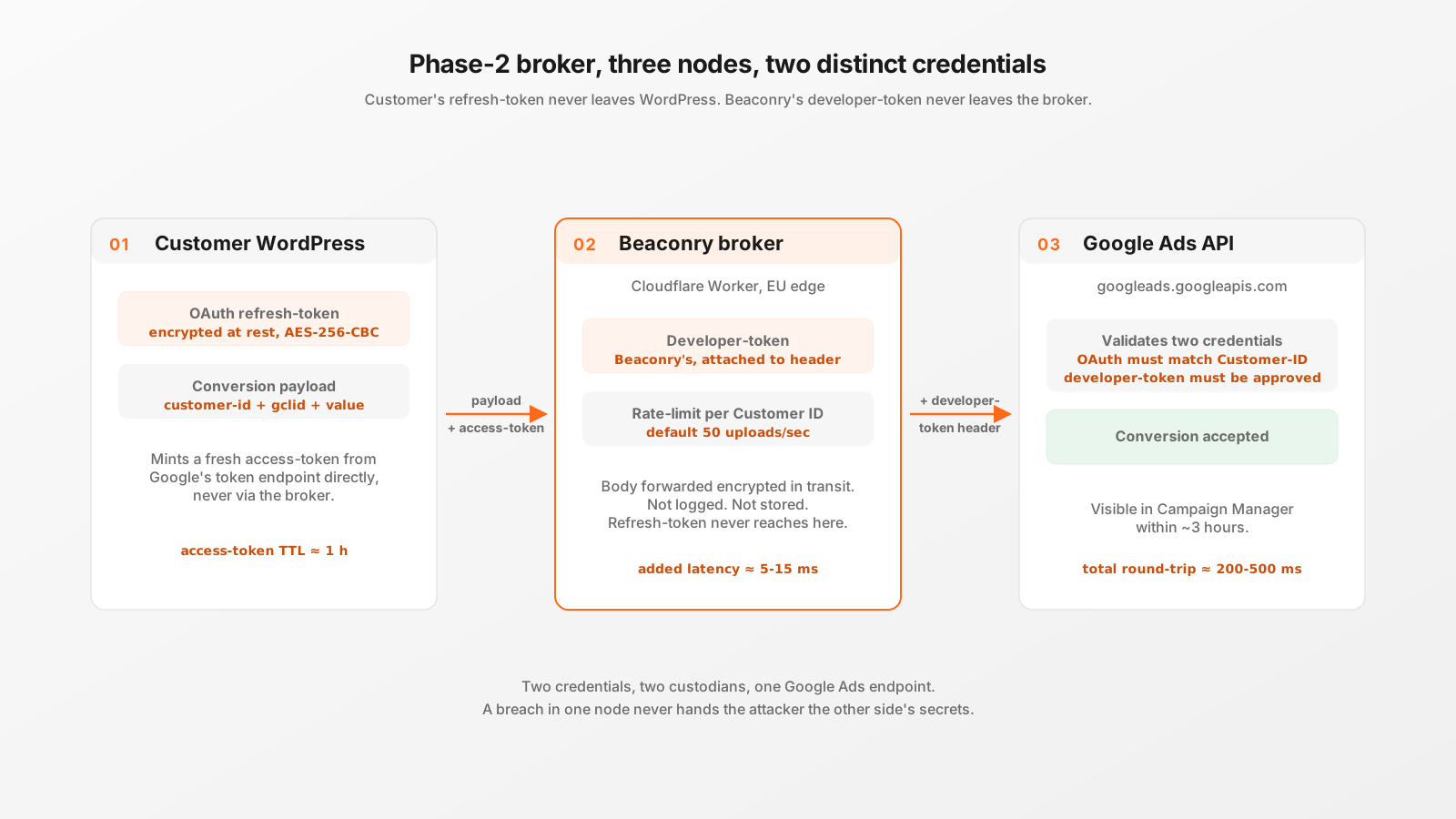
Two credentials, not one
Authenticating against the Google Ads API needs two distinct credentials, and that's the source of all the friction:
- A developer-token. Belongs to whoever wrote the application that uses the API. It identifies the integration to Google, gates API quota, and is what Google reviews during approval. One per integration, regardless of how many customers use the integration.
- An OAuth credential. Belongs to each individual Ad-account holder. Identifies which customer is uploading and to which Customer ID. Issued instantly via the standard OAuth handshake, no review.
The OAuth side is fast and well-trodden. The developer-token side is where the 4-to-6-week window lives.
How the developer-token approval actually works
Every new Google Cloud project that wants to talk to the Google Ads API starts in basic access: 15,000 API operations per day, sandbox-only against test accounts. Useful for development, useless for production conversion uploads.
To get standard access, what you need to upload real conversions, you submit a written application to Google. The form asks for use-case description, expected daily volume, integration architecture, data-handling practices, and screenshots of the integration. Google reviews. Reviews involve back-and-forth: clarifying questions, requests for more screenshots, often follow-up emails about edge cases.
The published target turnaround is "a few weeks". The realistic average across customers we have observed is 4 to 6 weeks, occasionally longer when Google's review queue is backed up. There is no escalation path for individual small customers.
Result: a small WordPress shop that wants to track Google Ads conversions server-side has to pause for over a month before they can even start.
Why "just self-host the token" is a non-starter
Two reasons the obvious workaround, get one developer-token approved, share it with all customers, does not work in practice.
First, Google's developer-token policy explicitly prohibits sharing tokens across customers you don't operate yourself. The token represents you as the integration author, vouching for how you handle data. Loaning it to third parties violates the terms of service.
Second, even if you ignored the policy, the audit trail would surface immediately. Google ties API operations back to the developer-token in their internal logs. If 500 unrelated customers' Customer IDs all show up under one developer-token, something is structurally off and Google notices.
The legitimate way to use one developer-token across many customers is for the developer-token holder to remain in the dispatch path, to actually be the integration that handles the upload, not just a credential lender.
The Phase-2 broker architecture
Beaconry runs a central Cloudflare Worker that holds Beaconry's own approved developer-token. The customer's WordPress install does not see this token. The customer's WordPress install holds an OAuth refresh-token issued to that customer's own Google account, scoped to that customer's Ad-account.
The flow on every conversion upload:
- WordPress assembles the upload payload (Customer ID, conversion-action ID, gclid, value, currency).
- WordPress mints a fresh access-token from its stored refresh-token (standard OAuth refresh, talks directly to Google's token endpoint, doesn't go through the broker).
- WordPress sends the payload + access-token to Beaconry's broker.
- Broker rate-limits (max N uploads/sec per customer, prevents accidental loops), attaches Beaconry's developer-token in the request header, forwards to
googleads.googleapis.com. - Google validates the OAuth token (must match the Customer ID), validates the developer-token (Beaconry's), accepts or rejects.
- Broker streams the response back to WordPress.
The broker is a transit layer for the upload body. It rate-limits, attaches the developer-token header, forwards. The body is HTTPS-encrypted in transit and not logged or stored.
What the broker does NOT see
Architecturally, the broker is a privileged forwarder. There is a non-trivial trust question: how do customers know we're not reading the bodies? Three concrete commitments:
- No body persistence. The Worker code is deployed from a public-facing source repository. No KV writes, no Durable Object writes, no log lines that include the request body. Cloudflare Workers do log request metadata (path, status, timing), but the body is not in those logs.
- End-to-end encryption from WP to Google. The TLS handshake completes between WordPress and
googleads.googleapis.comvia the broker's transparent forward. The broker terminates TLS to attach the developer-token header; it does not have access to the OAuth refresh-token (that one stays in WP and never touches the broker). - Customer Ad-account IDs visible, conversion content not. The broker logs which Customer ID an upload is for (needed for rate-limiting and quota allocation). It does not log gclids, conversion values, or any visitor-level data.
The trade-off is real and we don't pretend otherwise: customers trade "operate your own Cloud Run container" complexity for "trust Beaconry's broker code". Customers who can't take that trade have an explicit out, they can self-deploy the broker (it's open-source), bring their own developer-token (4-to-6-week wait reappears), and run it themselves.
Privacy guarantees: what the customer keeps
The asymmetry that makes the broker pattern work: refresh-tokens never leave the customer's WordPress.
- OAuth refresh-token: encrypted at rest in WP, used only to mint short-lived access-tokens directly from Google's endpoint.
- Access-tokens: minted in WP, used once per upload, expire in ~1 hour.
- Developer-token: lives only in the broker, never sent to WP.
If the broker is ever compromised, the attacker gets Beaconry's developer-token (we'd revoke it and re-apply, painful but bounded), but cannot impersonate any individual customer's Ad-account because they don't have any customer's refresh-token. If a customer's WP is compromised, the attacker gets that one customer's refresh-token (revocable in Google's account-security panel), but cannot upload to other customers' Ad-accounts.
Compare to "broker holds everyone's refresh-tokens" patterns: a single broker compromise would burn every customer simultaneously. Beaconry's split avoids that.
Latency and rate-limits
One Worker hop adds roughly 5-15 ms over direct WP-to-Google. Real conversion-upload latency is dominated by the Google Ads API itself (typically 200-500 ms server-side), so the broker hop is in the noise.
Rate-limits in the broker are configured per Customer ID, default 50 uploads per second. This is well above any plausible legitimate volume from a small-to-mid e-commerce site. The cap exists to catch loops and runaway integrations early, before they consume Google's quota for everyone sharing the developer-token.
Failure modes
The honest failure modes that have come up or could come up:
- Customer's Google account revokes the OAuth grant. Token expires, broker forwards a 401 from Google to WP, the dashboard shows "Reconnect to Google". Customer clicks Connect, OAuth handshake repeats, configuration restored. Conversion-Rule-IDs and Customer-ID stay in WP.
- Broker outage. Cloudflare Worker goes down (rare but possible). WP retries with exponential backoff for ~24 hours. Beyond that, conversions queued for that period are lost. Status-page integration alerts the operator before that window.
- Google rate-limit kicks in. Broker propagates the 429 back to WP. WP retries with backoff. If the customer is genuinely above their per-Customer-ID quota, they'll see retries plateau and need to talk to Google about quota.
- Beaconry's developer-token gets revoked. Service degrades for everyone simultaneously (the failure case that argues for self-deployment if you can't tolerate it). We have processes to keep token-health monitored, but this is the residual risk customers take on.
Take-away
If you want server-side Google Ads conversion uploads on a small WP site, the choice is: wait 4-to-6 weeks for your own developer-token, or use a broker pattern that abstracts the token without compromising your data ownership. The Phase-2 broker is the latter, with the architectural property that customer refresh-tokens stay in the customer's WP, only Beaconry's developer-token lives centrally. Same outcome at the Google Ads API endpoint, very different time-to-first-conversion.