
Find exactly which field kills your lead form
A contact form with a 60 % abandon rate is not a mystery you have to solve with guesswork. Beaconry records three signals per form (form_start, form_abandon, lead) and rolls them into a drop-off table that names the exact field where people give up. It is GA4-only, it never reaches an ad channel, and it stores field names and counts only, never a single value a visitor typed.
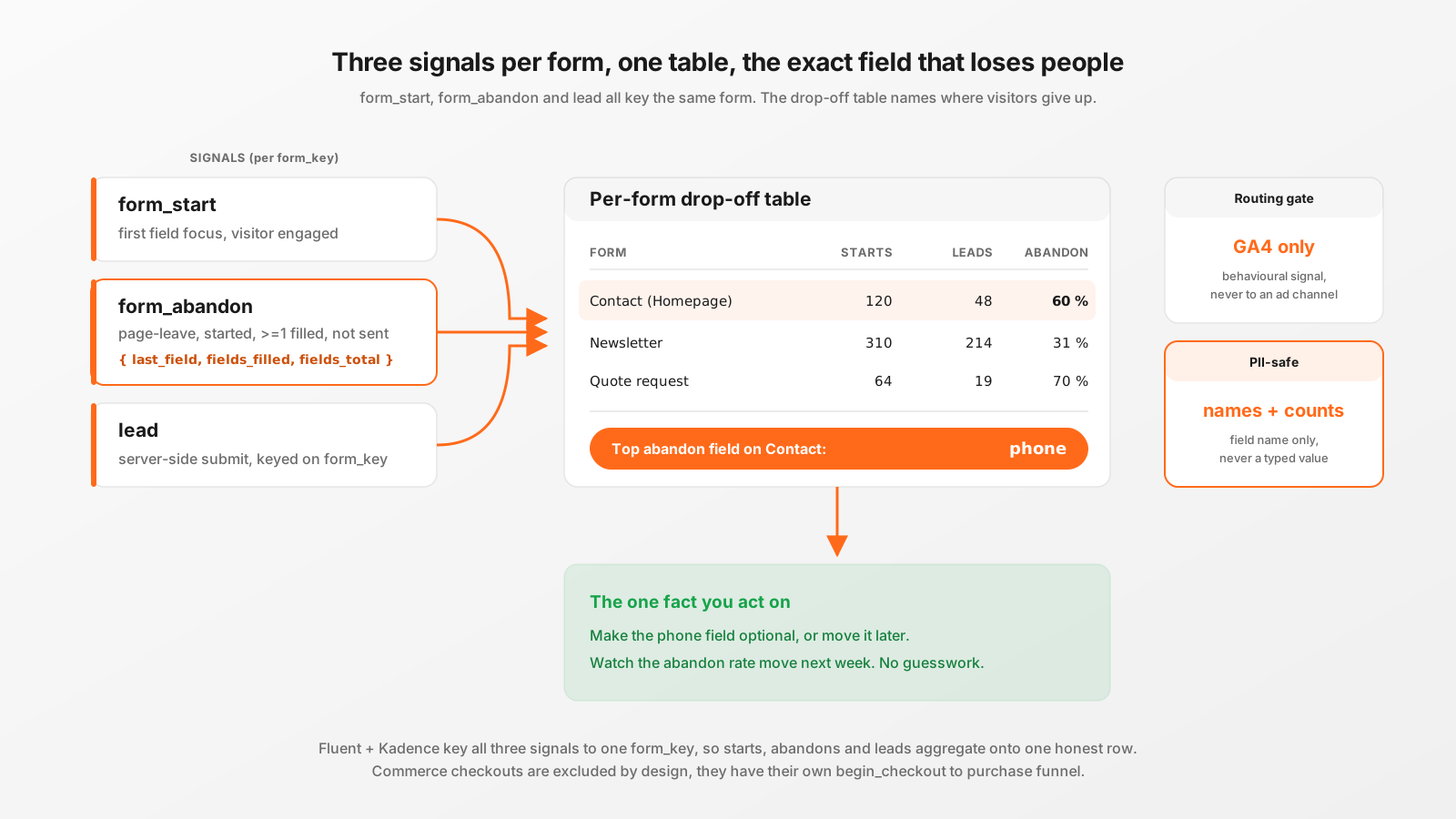
The question a funnel actually answers
"My form converts at 40 %" is a number. It is not actionable on its own. The actionable version is "of the people who start the form, most of the ones who give up give up on the phone-number field". That sentence tells you what to change: make the phone field optional, or move it later, or explain why you need it. You cannot get there from a single conversion percentage. You get there from a funnel that knows where in the form people stop.
Beaconry builds that funnel from three events, all keyed to the same form identifier:
form_startfires on the first focus of any field in the form. The visitor has engaged.form_abandonfires on page-leave when a form was started, has at least one filled field, and was not submitted. It carries the name of the last field the visitor touched.- lead submit is the server-side event Beaconry already fires when the form is actually submitted (
generate_lead,contact,subscribe, whatever the form maps to).
Starts minus submits gives you total drop-off. The last_field on each abandon, aggregated, gives you where. That second number is the one that changes what you build next.
How the three events find their way to the same form
The whole thing only works if the browser-side start and abandon land on the same form-key as the server-side submit. A funnel that counts 100 starts under one key and 40 leads under a different key is worse than no funnel at all, because it looks precise and is wrong.
Beaconry keys all three on one identifier. On the client, nl-data's detectFormKey() emits fluent_<id> or kadence_adv_<post_id>. That string is exactly what the server produces with sanitize_key( plugin . '_' . form_id ) when it fires the lead. So for Fluent Forms and Kadence Advanced Forms, start, abandon and submit all aggregate onto one row. For form plugins without a browser-side detectFormKey() match, the submit still records under the server form-key while start and abandon land under the DOM id, so you always get lead counts for every plugin and the full abandon funnel for the two that match cleanly.
The abandon detection itself is deliberately conservative. From the actual client code:
// form_abandon on page-leave: started, >=1 filled field, not submitted
var filledCount = 0;
for ( var f in st.filled ) {
    if ( Object.prototype.hasOwnProperty.call( st.filled, f ) ) filledCount++;
}
if ( filledCount === 0 ) continue; // started but typed nothing -> not an abandon

sendEvent( 'form_abandon', {
    form_id:       keyFor( formEl ),
    last_field:    st.lastField || 'unknown',
    fields_filled: filledCount,
    fields_total:  st.total || filledCount,
} );
A visitor who focuses a field and immediately leaves without typing anything is not an abandon. That is a bounce, and counting it would inflate the abandon rate on every form on the site. Only a started-and-partially-filled-and-not-submitted form counts. The payload is four keys: the form id, the last field name, and two counts. Look at what is not there.
Why field names and counts only, and nothing else
The single most important property of this feature is what it refuses to collect. The abandon event carries last_field (the field's name, like phone or company) and two integers. It never carries the value the visitor typed into that field. The class that stores it on the server side is explicit about this:
* PII-safe by construction: only field NAMES and counts are stored, never
* any entered value. The store therefore needs no GDPR special handling;
* the {@see RETENTION_DAYS}-day prune is a courtesy bound, not a
* data-protection requirement.
The server hardens it twice over. The last-field string is run through sanitize_text_field(), bounded to 60 characters, and empty or unknown values are kept out of the top-fields list entirely. The store keeps at most 40 distinct field names per form per day, sorted by frequency, so a form with hundreds of dynamic field names cannot balloon the option row.
This matters beyond good manners. A funnel that recorded the half-typed email address or the partial phone number a visitor abandoned would be a pile of personal data sitting in wp_options with no consent basis and no deletion story. By storing only the field name, Beaconry's funnel needs no special GDPR handling at all. The 90-day prune is there to bound the option size, not to satisfy a retention obligation, because there is no personal data to retain. You learn that people stall on the phone field without learning a single phone number.
Why it is GA4-only and never touches an ad channel
This is the part most people get wrong when they build it by hand, and it is the part Beaconry treats as non-negotiable. form_start and form_abandon are behavioural analytics signals. They are not conversions. Meta does not want a "someone abandoned a form" event in its optimisation set, TikTok does not want it, Google Ads does not want it. Sending behavioural noise to an ad platform's conversion API pollutes the optimisation signal the platform uses to find buyers, and on some platforms it triggers validation warnings.
Beaconry enforces the separation with two independent gates, either of which alone would do the job:
- The opt-in gate lives in the funnel observer. It always records the abandon into the in-plugin store, and then, for
form_abandon, it returnsnullto cancel the dispatch entirely unless the customer has explicitly switched onform_funnel_ga4. So by default an abandon only ever touches the local funnel store. Nothing goes on the wire at all. - The central routing gate lives in the forwarder. Right after the pre-dispatch filter, it matches the event name against
ANALYTICS_ONLY_EVENTS. A match routes the event to GA4 only and hard-stops before any ad channel runs. This is the single source of truth for the "internal signal versus ad-vendor conversion" split.
The second gate is the one that earns its keep over time. Because the rule is centralised on the event name, a newly added ad channel inherits it automatically. There is no per-channel skip-list to remember to update. When Beaconry adds the next conversion API, form_abandon is already excluded from it, with zero new code, because the gate runs before fan-out and the event name is on the analytics-only list.
This was a real bug before it was a rule. Up to v0.24.3 the opt-in gate returned the event to the whole fan-out, so a customer who switched on GA4 forwarding for abandons unknowingly leaked a form_abandon Custom Event to Meta as well. The central gate fixed that specific leak and, more importantly, made the entire class of leak impossible for any future channel. Net effect regardless of toggle state: an abandon reaches GA4 only when you ask for it, and reaches an ad vendor never.
What the drop-off table shows
The Forms tab renders one row per form with any activity, drawn from snapshot(). Each row is starts, submits, abandons, a conversion rate, an abandon rate, and the top three abandon fields by frequency:
$rows[] = [
    'form_key'        => $form_key,
    'label'           => $labels[ $form_key ] ?? $form_key,
    'starts'          => $starts,
    'submits'         => $subs,
    'abandons'        => $abnd,
    'conversion_rate' => $denom > 0 ? (int) round( ( $subs / $denom ) * 100 ) : 0,
    'abandon_rate'    => $starts > 0 ? (int) round( ( $abnd / $starts ) * 100 ) : 0,
    'top_fields'      => array_slice( $fields, 0, 3, true ),
];
The rows are sorted by traffic (starts plus submits) so your busiest forms are at the top. The label comes from the form catalogue Beaconry already maintains, so you read "Contact (Homepage)" and not kadence_adv_5. The window is switchable and clamped to the 90-day retention, so you can look at today, the last 7 days, or the last 30. A "Clear list" button wipes the store without stopping future tracking, since the retention cron re-schedules itself on the next plugin bootstrap.
The number you act on is top_fields. A row reading "120 starts, 48 leads, 60 % abandon, top field: phone" is a work order. You go make the phone field optional and watch the abandon rate move next week.
Why commerce checkouts are deliberately excluded
A WooCommerce, EDD or SureCart checkout is a form in the DOM sense, but it is not a lead form, and counting it here would actively mislead you. A checkout has its own funnel already (view_item to begin_checkout to purchase). Its submit happens over the Store API or AJAX with no native form-submit event, so from the form funnel's point of view every completed purchase looks like a started form that was never submitted, which would fire a form_abandon on every single sale. That would turn your best-converting page into your worst-looking form.
Beaconry blocks this two ways. First, a render-agnostic formFunnelExclude config flag, set server-side via the platform APIs (is_checkout(), is_cart(), edd_is_checkout()), disables the whole funnel on a commerce checkout or cart page, including EDD's own-markup block checkout that no CSS selector would reliably match. Second, an isCommerceForm() check in nl-data acts as a CSS-class backstop for the standard WooCommerce, EDD and SureCart checkout and cart component classes. Checkout-step abandonment is the commerce funnel's job, a begin_checkout with no purchase, and it stays there.
Contrast: the hand-built GA4 funnel
You can approximate this in GA4 directly. People do. Here is what it actually takes, and why the result is worse.
First you need the events to exist. GA4 has no built-in "form abandoned on field X" event, so you wire up Google Tag Manager triggers on form-field focus and on page-leave, write custom JavaScript to track which field was last touched and whether the form was submitted, push that into the data layer, and register form_id and last_field as custom dimensions or event parameters in the GA4 admin. That GTM container loads from googletagmanager.com, which is exactly the third-party domain an adblocker drops, so your funnel data is already biased toward the visitors least likely to be the ones abandoning in frustration. Then you build an exploration funnel in GA4, hope the custom dimensions populate, and wait out the processing delay before the data is usable.
Now the part that bites later. If your GTM tag for the abandon event sits in the same container that forwards conversions to Meta and TikTok, it is genuinely easy to let that behavioural event flow into an ad platform's signal by accident, the same leak Beaconry's central gate exists to prevent, except in GTM there is no single gate, just per-tag trigger conditions you have to get right and keep right. And the data layer push for "last field touched" frequently ends up carrying the field value alongside the name unless you are careful, which quietly seeds GA4 with PII.
Beaconry collapses all of that to one toggle. The events are first-party and same-origin, so the adblock bias is gone. The PII boundary is enforced in code, not in your GTM discipline. The GA4-only routing is a centralised gate, not a set of per-tag conditions. You do not build a funnel; you read one.
Take-away
A conversion rate tells you a form is leaking. A funnel tells you where. Beaconry's per-form funnel records form_start, form_abandon and lead, keys all three to the same form so the math is honest, and surfaces the exact field where people give up. It stays GA4-only behind two independent gates so the behavioural noise never pollutes an ad channel, and it stores field names and counts only, so there is no PII to protect and no GDPR story to write. You get the one fact that changes what you build next, which field to fix, without inheriting the adblock bias, the leak risk, or the PII exposure of a hand-built GA4 funnel.