
Fire conversions on any button with one CSS class
Most conversions on a site are not form submits or WooCommerce orders. They are clicks: a Buy button that opens an external checkout, a Contact CTA that scrolls to a phone number, a pricing-page link that hands off to Polar or Stripe. Beaconry covers those with five generic CSS slots. Add one class to the element, and the click fires a server-side conversion through the same pipeline as everything else. No JavaScript to write, no vendor snippet to paste.
The gap between form hooks and commerce hooks
Beaconry has deep server-side coverage where it can hook the platform directly. Form plugins fire a lead when a submission lands in PHP. WooCommerce, EDD and SureCart fire a ten-event funnel from real order hooks. Those paths are precise because the data is right there on the server: the form fields, the order total, the line items.
But a lot of high-value intent never reaches a server hook on your site. A button that opens buy.polar.sh in a new tab navigates away before any PHP runs. A "Book a call" link that points at Calendly leaves your domain entirely. A "Download the trial" anchor triggers a file response, not a form submit. There is no submission, no order, no hook to listen on. The only signal is the click itself, in the browser, the moment it happens.
Click-tracking fills exactly that gap. It is a browser-side capture for elements that have no server-side equivalent, wired so the resulting event still travels the same same-origin REST path and the same server-side fan-out as a real form lead. You tag the element, Beaconry does the rest.
The five slots, and what each one actually fires
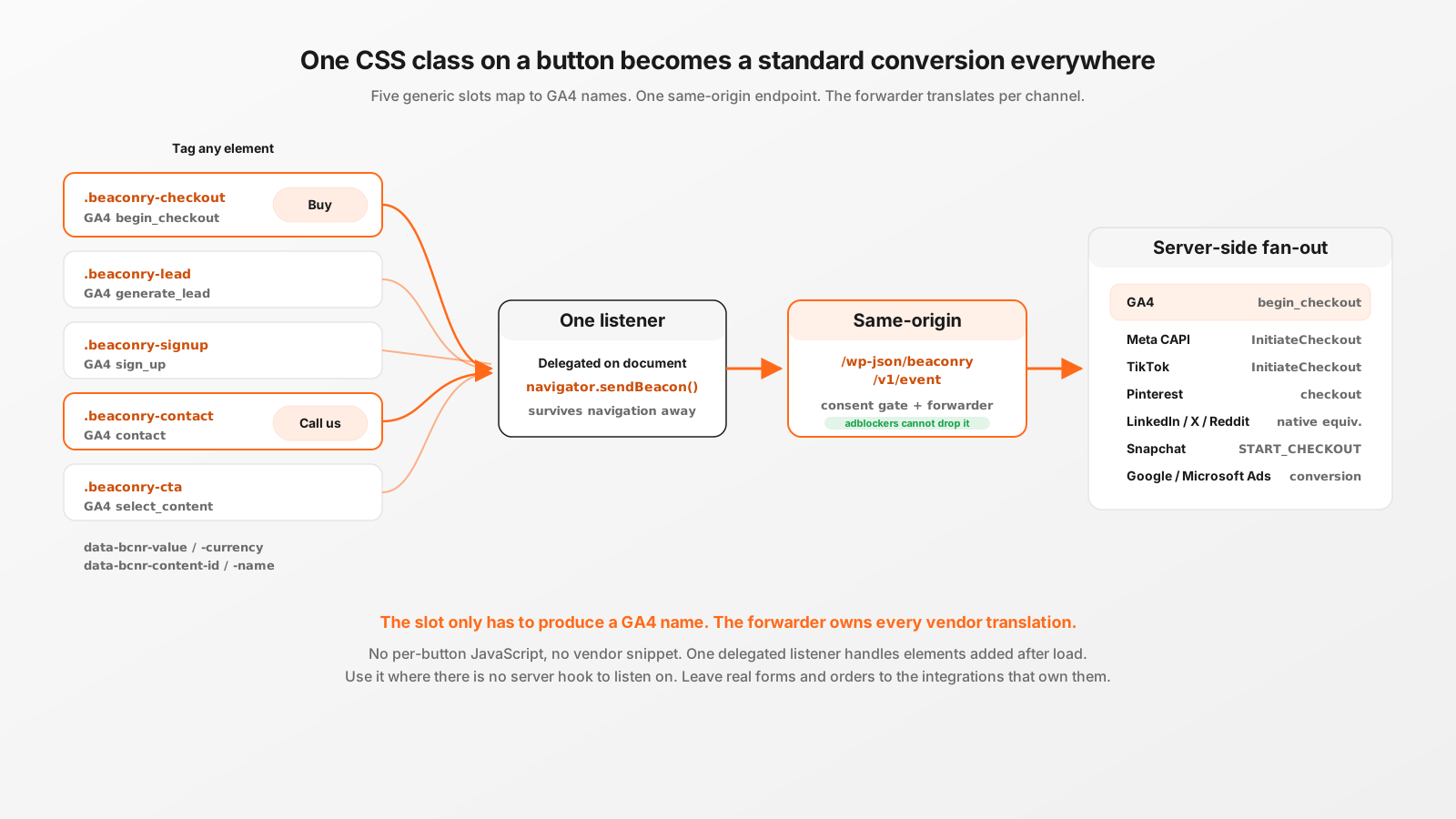
There are five CSS classes. Each maps to one GA4 canonical event name, and the forwarder then maps that GA4 name to every channel's own event vocabulary. The point of using standard advertising events (instead of one generic "click" event) is that Meta, TikTok, Pinterest and the rest keep their optimisation signal: a begin_checkout tells Meta to optimise for checkout intent, a generic custom event tells it nothing.
Here is the verified mapping, straight from setupClickTracking() in the bundled engine and EVENT_MAP_GA4_TO_META in the forwarder. (One thing to watch: the checkout slot fires GA4 begin_checkout, not initiate_checkout. begin_checkout is GA4's canonical spelling; the forwarder is what translates it into Meta's InitiateCheckout. Mixing the two up sends an event GA4 silently drops.)
| CSS class | GA4 event | Meta CAPI event | Typical use |
|---|---|---|---|
.beaconry-checkout | begin_checkout | InitiateCheckout | Buy / Subscribe / Add-to-cart hand-off to an external checkout |
.beaconry-lead | generate_lead | Lead | Quote request, "Talk to sales", gated download |
.beaconry-signup | sign_up | CompleteRegistration | Free-trial start, account creation, waitlist join |
.beaconry-contact | contact | contact (custom event) | Phone / email / WhatsApp / "Book a call" CTA |
.beaconry-cta | select_content | ViewContent | Generic high-intent button you still want to measure |
Two of these resolve in a way worth knowing. .beaconry-contact has no Meta standard event, so the forwarder passes the GA4 name through unchanged and Meta records a custom event literally named contact. .beaconry-cta maps onto Meta's ViewContent, which is a real standard event, so it carries optimisation weight rather than being dropped into a custom-event bucket. Both are deliberate: a custom event is still trackable, a standard event is preferable when one fits. The same GA4 name fans out to TikTok, LinkedIn, Pinterest, Snapchat, Reddit, X, Google Ads and Microsoft Ads through their own maps, so you set the slot once and every configured channel receives its native equivalent.
How the capture works under the hood
The whole feature is one delegated click listener on document, set up inside the bundled nl-data.js engine. There is no per-button binding, so it keeps working for elements added after page load (a price table rendered by a block, a modal injected later). The listener walks up from the click target with closest() to find a tagged ancestor, reads the matched class, builds the payload, and ships it.
Delivery uses navigator.sendBeacon(). That detail matters more than it looks. A normal fetch() fired on a click that also navigates the browser away (an external Buy link) gets cancelled mid-flight when the page unloads, and the event is lost. sendBeacon() is built for exactly this: the browser guarantees the request is queued and sent even as the page tears down. So a Buy button can both navigate to the external checkout and reliably fire its conversion.
From there the event is ordinary. It POSTs to /wp-json/beaconry/v1/event on your own domain (same-origin, so adblockers cannot drop it without breaking WordPress), the REST endpoint validates consent and normalises the name, and BCNR_Forwarder::dispatch() fans it out server-side. No channel-specific browser code runs. That is the entire reason a generic CSS class can feed ten ad platforms at once: the slot only has to produce a GA4 canonical name, and the existing server-side machinery handles every vendor translation.
One safeguard built into the engine: when click-tracking is active, the auto-events for outbound links and contact links skip any element that already carries a .beaconry-* class, so a tagged Buy button does not also fire a generic click or contact auto-event. You get one clean conversion, not a doubled signal. (When click-tracking is switched off, those classes are treated as purely decorative and the auto-events fire normally, so leaving a stray class in a theme template never silently swallows a signal.)
Per-button overrides with data attributes
The class chooses the event type. Data attributes fill in the values for that specific button. Everything is optional: a bare class fires a zero-value conversion with the button's own text as a label, which is fine for a Contact CTA. A Buy button usually wants a price and a product identity so the value lands in reporting and the catalog match works for Dynamic Product Ads.
| Attribute | Goes to | Notes |
|---|---|---|
data-bcnr-value | event value + items[0].price | Numeric. Falls back to the per-slot default set in the Tracking tab, then 0. |
data-bcnr-currency | event currency | Three-letter ISO, upper-cased automatically. Defaults to your configured currency, then EUR. |
data-bcnr-content-id | content_ids[] + items[0].item_id | Your SKU or tier slug. Supplying it builds a single-item items[] array so GA4 accepts the event for revenue reports. |
data-bcnr-content-name | content_name + items[0].item_name | Human-readable product name. |
data-bcnr-label | event label | Overrides the auto-captured button text. Handy when the visible text is an icon or is too generic. |
A real Buy button handing off to an external Polar checkout:
<a class="beaconry-checkout"
   href="https://buy.polar.sh/polar_cl_WVaBy3MStSJXOSCilMYu4RhA5DBFcGicJbgHo1IkT3A"
   data-bcnr-value="149"
   data-bcnr-currency="USD"
   data-bcnr-content-id="studio-tier"
   data-bcnr-content-name="Beaconry Studio">
  Buy Studio
</a>
On click this fires GA4 begin_checkout with value 149 USD and a one-item items[] array, which the forwarder turns into Meta InitiateCheckout, TikTok InitiateCheckout, Pinterest checkout and so on, each with the content id attached for catalog matching. The visitor lands on the Polar checkout; the conversion was queued with sendBeacon() before the navigation completed.
A Contact CTA that needs nothing but the class:
<a class="beaconry-contact" href="tel:+1-555-0142">
  Call us
</a>
This fires GA4 contact with value 0 and the label "Call us", recorded on Meta as a custom contact event and routed to every other channel's lead-style equivalent. No value, no content id, because a phone call has none. If you later decide phone leads are worth a fixed estimated value, add data-bcnr-value="50" and nothing else changes.
When to use click-tracking, and when not to
Click-tracking is the right tool when the conversion has no server-side footprint on your site. Use it for external checkout hand-offs (Polar, Stripe Payment Links, Gumroad), for off-site booking and scheduling links, for tel / mailto / WhatsApp CTAs, and for affiliate or partner links you still want to attribute. In all of those, the click is the only moment you can observe the intent.
It is the wrong tool when a precise server-side hook already exists, and reaching for it there actively costs you accuracy:
- Real form submits belong to the form integrations, not click-tracking. The form hooks fire on the actual submission (after validation, after the lead is saved) and can attach hashed PII (email, phone) for match-rate. A click on the submit button fires too early: it cannot see whether validation passed, and it has no field data. Tag the form in the Forms tab instead.
- WooCommerce, EDD and SureCart purchases belong to the commerce funnel. Those fire from order hooks with the real total, the real line items, and a stable per-order event id so a thank-you-page refresh never double-counts. A click on "Place order" has none of that and would mis-fire whether or not the payment actually went through.
- An on-site multi-step checkout is the commerce funnel's job, measured as
begin_checkoutwithout a followingpurchase. Do not paper over it with a.beaconry-checkoutclick on the "Proceed" button.
The rule of thumb: if the conversion produces a server hook, use the integration that listens on it, because it sees more (totals, items, PII) and fires at the right moment. If the conversion is a navigation or a browser-only action with no hook, that is precisely what click-tracking is for.
Turning it on
Click-tracking is off by default. Switch it on under WordPress Admin, Beaconry, Tracking, Click-Tracking, where you can also set the per-slot default values that a button uses when it has no data-bcnr-value of its own. From then on, any element on the site carrying one of the five classes is live.
For staging sites that share a production database there is a hard kill switch: define( 'BCNR_CLICK_TRACKING_ENABLED', false ); in wp-config.php overrides the database toggle, so a staging copy never fires click conversions even though it inherited the "on" setting from the cloned database. (The same constant set to true force-enables it, but the database toggle is the normal path.)
If you also run Hybrid Mode for a channel (the browser pixel alongside the server-side dispatch), click-tracking automatically mirrors the event to that pixel with the same event id, so the vendor deduplicates the browser and server copies into one. That is the same dedup mechanism the commerce and form paths use, covered in the hybrid-mode post linked below.
Take-away
Click-tracking is the escape hatch for conversions that never touch a server hook. Five CSS classes (checkout, lead, signup, contact, cta) each map to a standard advertising event, so a single class on a Buy button or a Contact CTA fans out to every configured channel in that channel's own vocabulary. Data attributes add value and product identity per button. sendBeacon() makes it survive the navigation away. And the same-origin REST path plus the shared server-side forwarder mean the whole thing is adblock-resistant and vendor-agnostic without a line of integration code. Reach for it when there is no hook to listen on, and leave the precise paths (forms, commerce) to the integrations that own them.