
Click-IDs explained: gclid, fbclid, ttclid, li_fat_id side by side
When someone clicks an ad and lands on your site, the platform appends a token to the URL. That token, the click-ID, is the strongest single attribution signal the platform has. Each network does it slightly differently. The mechanics, lifetime and capture rules in one place.
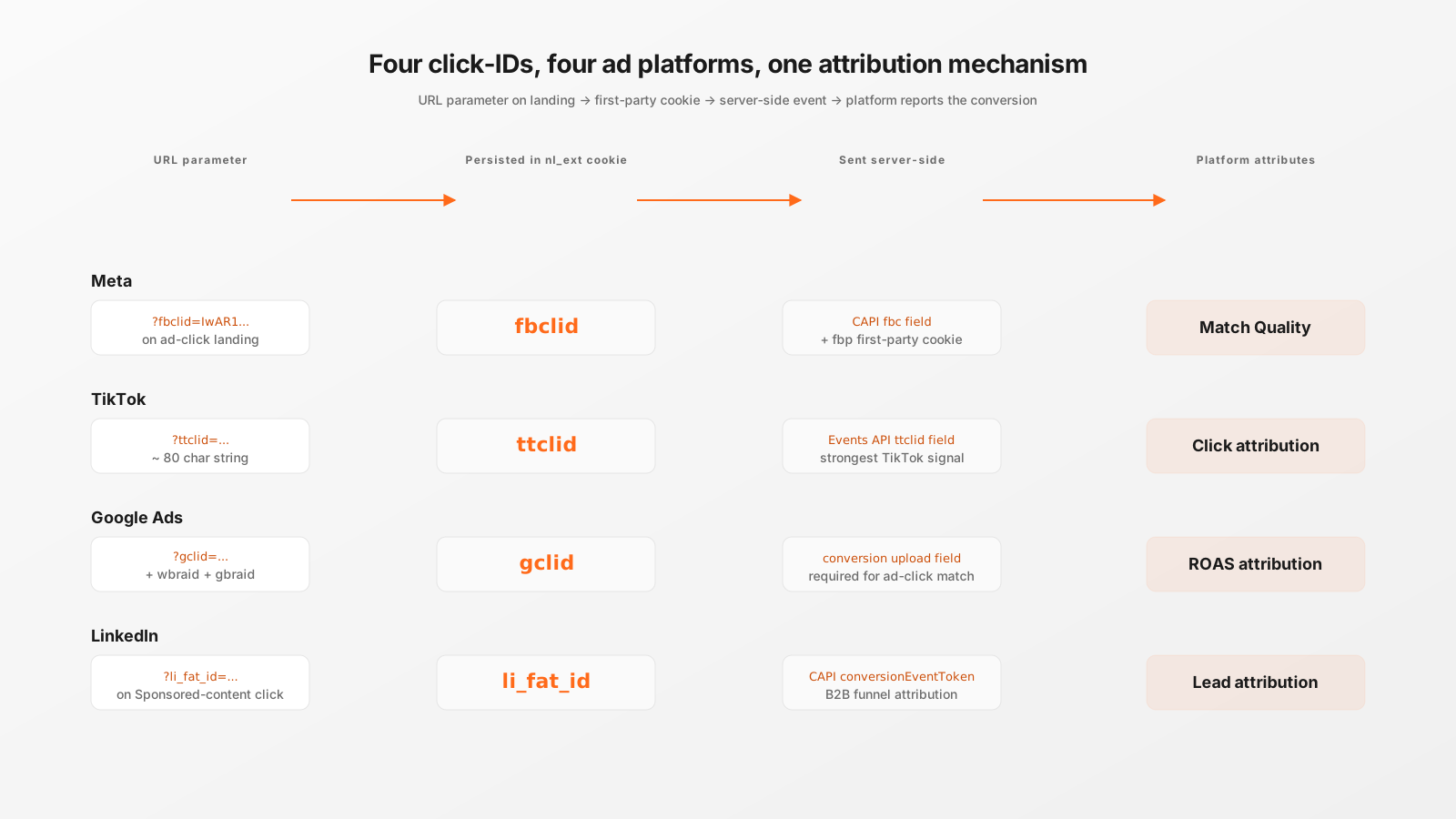
What a click-ID actually is
An ad-click takes the visitor from the ad surface (Google Search, Facebook feed, TikTok For You, LinkedIn timeline) to your landing URL. Right before the redirect, the platform appends a query parameter to the URL: ?gclid=..., ?fbclid=..., ?ttclid=..., ?li_fat_id=.... The value is a signed, opaque token that only the platform can decode. It encodes the campaign, ad-group, creative, the timestamp of the click and a checksum that proves the click came from the platform's own ad server.
Once you send that token back to the platform alongside a conversion event, the platform can match the conversion to the original click with certainty. No fingerprinting, no cookie matching, no probabilistic attribution. Just a one-line proof.
The four click-IDs side by side
| Platform | Parameter | Lifetime | Server field |
|---|---|---|---|
| Google Ads | gclid (also wbraid, gbraid) | 90 days, click-through | gclid on click_conversion upload |
| Meta | fbclid | 7 days for cookie matching | fbc field on CAPI event |
| TikTok | ttclid | 30 days, signed | ttclid on Events API event |
li_fat_id | 180 days for B2B funnels | conversionEventToken on CAPI |
Capture: read once, store immediately
Click-IDs only exist in the URL of the very first page the visitor lands on. After they navigate to a second page, the parameter is gone. If you don't capture and persist the value before the visitor moves, you lose attribution for everything that comes after.
Beaconry's nl-data.js reads document.location.search on the very first page-view, extracts every known click-ID parameter at once and stores them in a single first-party cookie called nl_ext. The structure is JSON: {"gclid":"...","fbclid":"...","ttclid":"...","li_fat_id":"..."}. Cookie scope is your domain only, expiry is 90 days, consent-gated.
Persistence and decay
Each platform has its own attribution window. After that window passes, the platform stops accepting the click-ID for matching even if you still send it. The practical effect:
- If the visitor converts within 7 days for Meta, sending
fbclidworks. - If they convert at day 8, the
fbclidis technically still innl_extbut Meta will reject the match. - Meta's first-party
fbpcookie (set by the browser pixel in hybrid mode) extends this to 90 days as a backup signal.
Beaconry sends every click-ID it has on every event. Platforms ignore expired values, no harm done. The opposite mistake, deliberately stripping out expired IDs, costs you the boundary cases where the platform's window happened to extend.
What Beaconry sends, per channel
- Meta CAPI:
fbcfield constructed fromfbclid+ landing timestamp, plus thefbpcookie when hybrid mode is on. - TikTok Events API:
ttclidfield as captured, plus_ttpcookie in hybrid mode. - Google Ads API:
gclidon every conversion-action upload.wbraidandgbraidsent when present (mobile and iOS-attribution variants). - LinkedIn CAPI:
conversionEventTokenbuilt fromli_fat_id, attached to the event.
For the conversion event payload, Beaconry attaches whichever click-IDs match the channel being dispatched to. A purchase event sent to Meta gets fbc, the same purchase event sent to Google Ads gets gclid. No cross-contamination.
What goes wrong without click-IDs
Conversion attribution falls back to the next-strongest signal the platform has:
- First-party cookie set by the platform's own browser pixel (only available with hybrid mode).
- Hashed PII match (email, phone) submitted in a form during the same session.
- IP plus user-agent fingerprint, the weakest signal, often dropped entirely on iOS.
For ad-click visitors who convert without filling a form, click-ID is the difference between "attributed correctly" and "untracked". Net effect on a typical e-commerce setup: 30-50 % of paid-search conversions become invisible to Google Ads if gclid isn't captured and replayed.
Direct visits and organic traffic
Visitors who arrive without a click-ID, organic search, direct traffic, referral, never have one. There's nothing to capture, the nl_ext cookie stays empty for them. Beaconry sends the conversion event with the click-ID field empty; platforms simply don't credit the conversion to a paid click. That's correct behaviour, since it wasn't a paid click.
Common pitfalls
- URL stripping. Some CDNs and security tools strip query parameters they don't recognise. If you see no click-IDs landing in
nl_ext, check Cloudflare Page Rules and any "Always Online" tooling for parameter stripping. Whitelist the four click-ID names. - Server-side redirects. If your landing URL redirects to a canonical path, make sure the redirect preserves the query string.
301 /landing?fbclid=... → /homedrops thefbclid. - Single-page apps. SPAs that handle navigation client-side without page-loads don't trigger Beaconry's URL-parsing on subsequent navigations. Capture happens on initial load only, which is what you want, but make sure the SPA doesn't replace the URL via
history.replaceStatebefore Beaconry runs. - iOS Mail privacy and email click-throughs. iOS Mail prefetches links, which means the click-ID gets "spent" by Apple's prefetcher, not the human visitor. Mitigation: campaigns to email lists should expect 10-15 % attribution loss on iOS audiences regardless of tracking tool.
Take-away
Four query parameters, four platforms, one architectural pattern: read on landing, persist in a first-party cookie, replay on every conversion event. Beaconry handles all four out of the box, in the same nl_ext cookie, with the right server-side mapping per channel. The only thing the customer has to think about is whether the URL actually arrives intact, which is usually a CDN configuration question rather than a tracking question.