
TikTok Events API with Beaconry: ttclid in, fourteen events out
TikTok Events API 2.0 over the WordPress REST endpoint. Pixel ID + access token, ttclid auto-captured from URL, all 14 standard events ship out of the box. None of TikTok's "Recommended" GDPR-risky defaults are required.
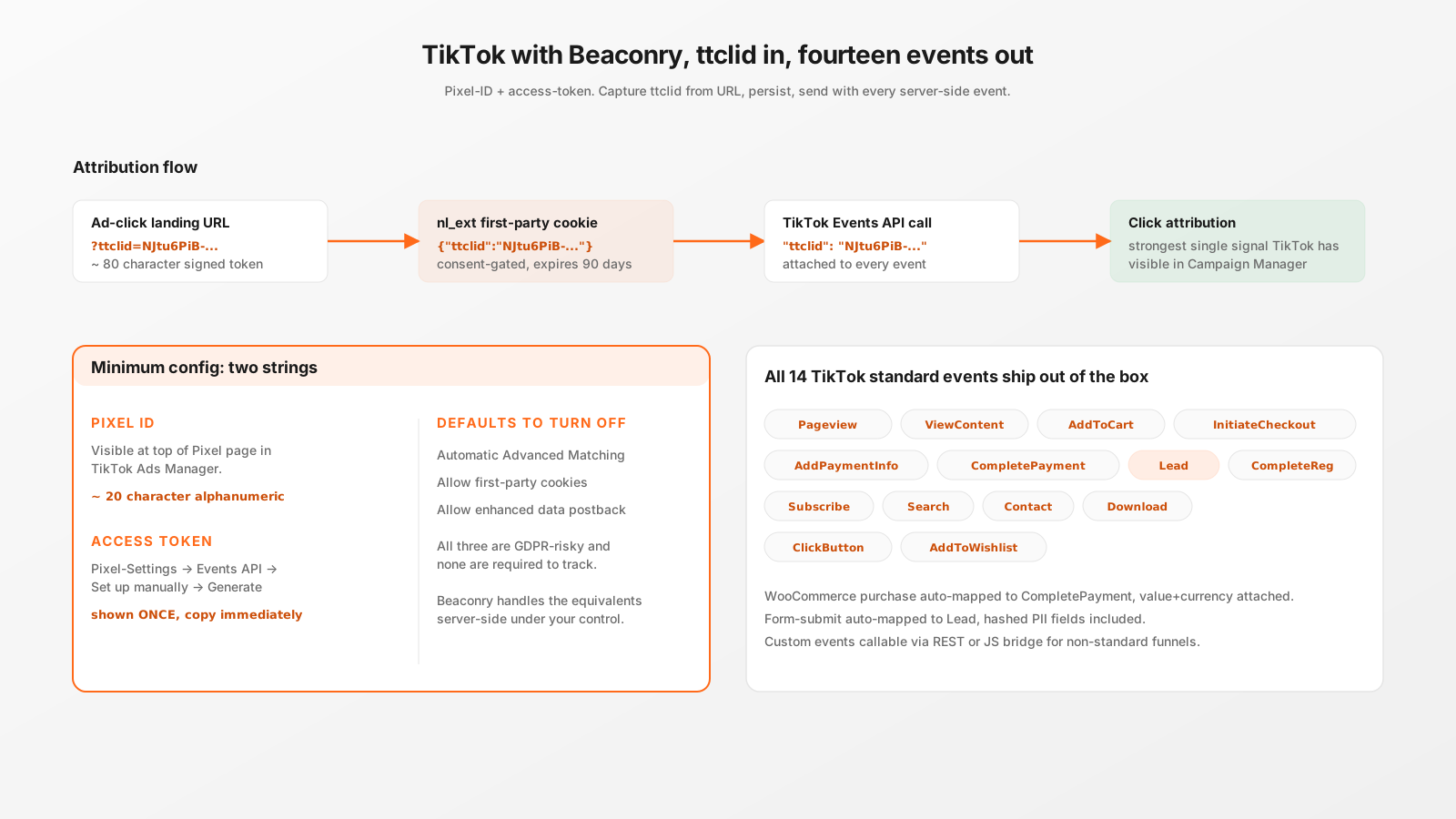
Setup, two strings
Pixel ID and access token. Generate both in TikTok Ads Manager → Tools → Events → Web Events. Use connection method "TikTok Pixel + Events API (Recommended)" so hybrid mode stays available. Skip the browser-pixel HTML snippet, Beaconry doesn't need it.
Paste both into Beaconry → Tracking → TikTok, save. Click "Send TikTok test event". HTTP 200 with code: 0 means credentials work.
ttclid: TikTok's strongest attribution signal
When a visitor lands from a TikTok ad, the URL has ?ttclid=.... Beaconry captures it on the very first page-view, persists it in the nl_ext first-party cookie (consent-gated, 90-day expiry, scoped to your domain). Every subsequent server-side event includes ttclid in the Events API payload, regardless of how many pages the visitor browsed in between.
For TikTok's matching, ttclid is the strongest signal. Better than hashed PII, better than IP+UA. If you only had one signal to send, ttclid would be the right pick. Beaconry sends ttclid plus everything else, so you don't have to choose.
14 events out of the box
All 14 TikTok standard events are supported with auto-mapping from WordPress events. The most-used:
Pageviewon every consented page-load.ViewContentat 50 % scroll + 10 seconds engagement.AddToCart,InitiateCheckout,AddPaymentInfo,CompletePaymentfrom WooCommerce.Leadfrom Kadence / Fluent form submissions.CompleteRegistrationfrom WP user-register hook.Subscribefrom newsletter-form events.- Plus
Search,Contact,Download,ClickButton,AddToWishlistfor niche cases.
What Beaconry sets to OFF on your behalf
TikTok's onboarding wizard tries to default-on three GDPR-risky toggles. Beaconry's defaults sidestep them all:
- Automatic Advanced Matching off. Beaconry hashes the same fields server-side under your control, only on actual form submits.
- First-party cookies (TikTok-managed) off. The
_ttpcookie only gets set if you explicitly enable hybrid mode, and even then via the consent-gated nl-data-gate. - Enhanced data postback off. Beaconry's events are explicit and auditable, no opaque "additional context" gets sent.
You still set these toggles inside TikTok's UI (Beaconry can't toggle Meta-side or TikTok-side settings), but the documentation makes clear what to switch off. See the TikTok Events API article for the full walkthrough.
Hybrid mode, optional
For TikTok, hybrid mode loads the browser pixel alongside server-side dispatch. Both fire the same event with the same event_id, TikTok deduplicates within a 24-hour window. Match-rate boost when the visitor's first-party cookies (_ttp) become available.
Off by default, recommended on for retail B2C audiences with low adblock rates. Skip for B2B and dev audiences (the browser pixel gets blocked anyway).
What you still configure in TikTok
- Test Event Code for staging. Generate it in TikTok Events Manager → Test Events tab. Paste into Beaconry's Test Event Code field. Remove before launch.
- Conversion attribution windows, set in your campaign-level configuration. TikTok defaults to 7-day click + 1-day view; B2B campaigns often benefit from 28-day click windows.
Take-away
TikTok with Beaconry is the cleanest of the five channels: two strings to paste, ttclid auto-captured, 14 events automatically mapped, none of TikTok's invasive defaults required. The article on TikTok onboarding defaults covers the configuration choices in TikTok's UI; this article is about what Beaconry does on your side.