
Meta Pixel + Conversions API with Beaconry: Pixel ID and access token in one screen
Meta is the channel where Beaconry's match-rate work is most visible. Server-side CAPI dispatch with hashed PII out of the box, optional hybrid mode for fbp/fbc cookies, dedup via stable event_id. Match Quality climbs from "Poor" to "Good" in a week.
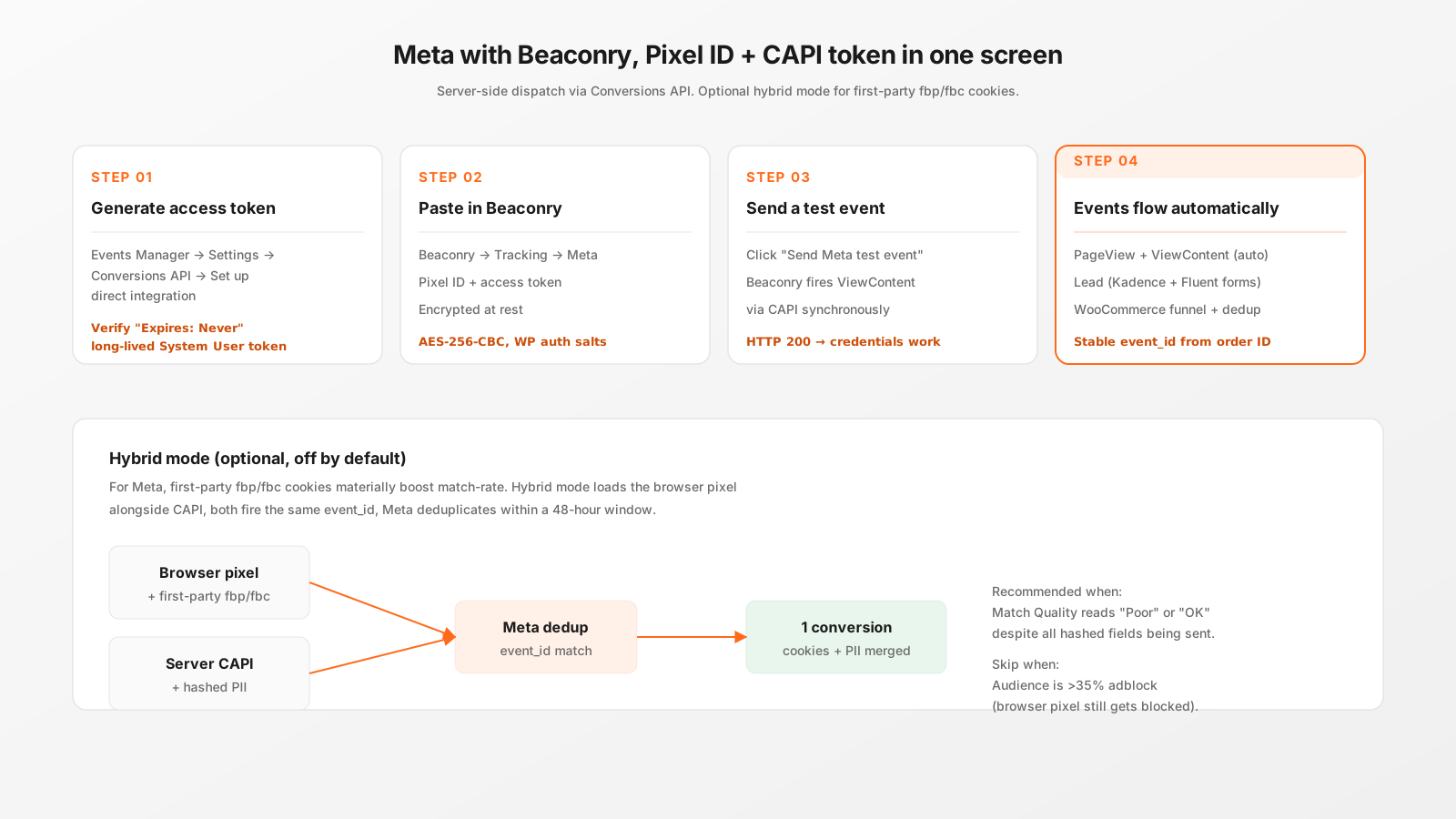
Setup, four steps
- Generate access token. Events Manager → Settings → Conversions API → Set up direct integration. Verify "Expires: Never" before you copy the token. Long-lived System User token, scoped to one Pixel.
- Paste in Beaconry. Tracking → Meta. Pixel ID + access token, save. Encrypted at rest with AES-256-CBC.
- Send a test event. The button fires a synchronous ViewContent via CAPI. HTTP 200 = credentials work. With Test Event Code set, the event lands in Test Events; otherwise live.
- Events flow automatically. PageView, ViewContent (50% scroll + 10s), Lead (Kadence/Fluent forms), AddToCart / InitiateCheckout / Purchase / Refund (WooCommerce). All with hashed PII and stable event_id.
What gets hashed and sent
For every event, Beaconry assembles the user_data object Meta expects:
em: SHA-256 of the lowercased email.ph: SHA-256 of the digits-only phone number with country code.fn,ln: SHA-256 of lowercased first/last name.ct,st,zp: city, state, ZIP, lowercased and stripped.fbc: constructed fromfbclid+ landing timestamp, persisted innl_extfor 90 days.fbp: only sent when hybrid mode is on and the browser pixel has set the cookie.client_ip_address,client_user_agent: server reads them from the request, Meta hashes them.external_id: WooCommerce customer ID for logged-in purchases. Empty for anonymous.
The hashing follows Meta's matching guidelines exactly. Fields that are missing are simply omitted; Meta's algorithms don't penalise missing fields, they only use what they get.
Hybrid mode, when to enable it
For Meta specifically, hybrid mode pays off more than for the other channels because Meta's match-rate is unusually sensitive to first-party cookies. Enable when:
- Your audience is mostly retail-mainstream (low adblock rate).
- Match Quality currently reads "OK" or "Good" and you want to push to "Great".
- You're running large-budget Smart-Bidding campaigns where match-rate directly drives ROAS.
Skip when adblock rate is >30 % (B2B, dev audiences). The hybrid pixel gets blocked anyway, you keep the server-side path, no benefit gained but +30 KB shipped.
Test Event Code, the staging flag
Beaconry has a "Test Event Code" field in the Meta channel setup. While set, every event is tagged with test_event_code and routes to Events Manager → Test Events instead of going live. Useful for staging environments where you want to verify the pipeline without polluting production reporting.
Critical: remove the test code before launch. Live conversions tagged with a test code will not appear in Meta's standard reporting, which means Smart-Bidding won't optimise on them. We've seen multiple customers ship to production with a test code still set; symptom is "Meta says zero conversions even though we know we have orders". Check this first.
What you still configure in Meta
- Domain Verification in Business Settings → Brand Safety → Domains.
- Trusted domains list on the Pixel → Settings → Traffic Permissions.
- Aggregated Event Measurement priorities, ranked Purchase > SubmitApplication > Lead > ViewContent.
None of these are Beaconry-specific; they're Meta-side configuration that any CAPI setup needs. Beaconry can't do them for you because they require a Meta-side login.
Take-away
Meta is the highest-ROI channel for server-side dispatch. Beaconry's setup is two strings (Pixel ID + token) plus an optional Test Event Code, the rest is automatic. Match Quality climbs from "Poor" to "Good" once domain verification is also in place; from "Good" to "Great" with hybrid mode and AEM priorities.