
LinkedIn Conversions API with Beaconry: OAuth in 30 seconds, 5 conversion-rule slots
LinkedIn Conversions API needs five things: an OAuth token, an Ad-Account ID, and one conversion-rule URN per event-type you want to track. Beaconry handles the OAuth handshake; the rest is paste-and-save.
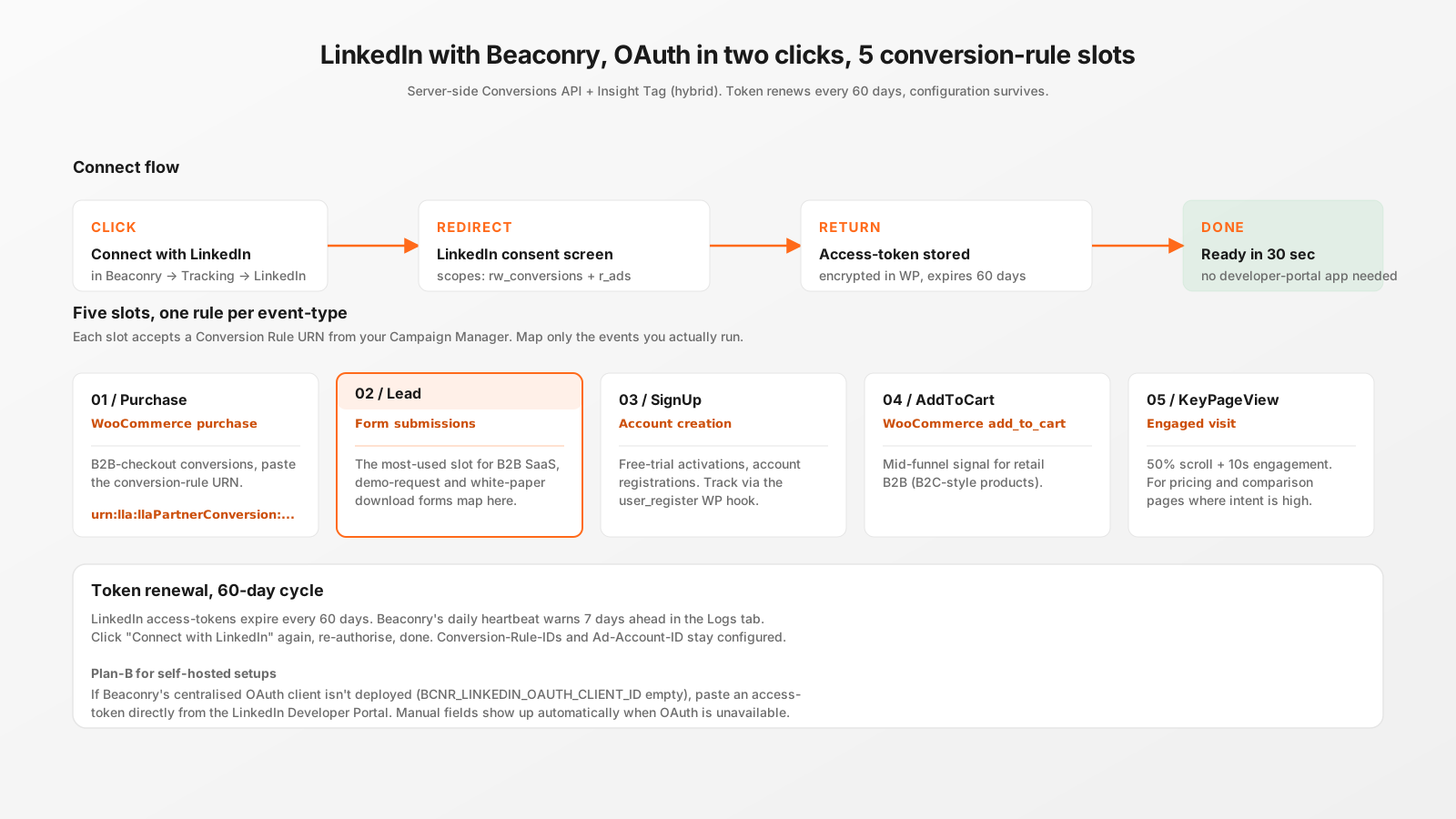
OAuth in 30 seconds
Click "Connect with LinkedIn" in Beaconry → Tracking → LinkedIn. LinkedIn shows a consent screen scoped to rw_conversions + r_ads, you approve, you're back in Beaconry with the token stored encrypted. Total time: about 30 seconds, no LinkedIn Developer Portal app needed.
The account that runs the OAuth needs Account-Manager, Campaign-Manager, or Account-Billing-Admin role on the Ad Account. Viewer-only is rejected by the API. If you're an agency running tracking for clients, the client needs to grant your account the role first.
Ad-Account ID
Open Campaign Manager, look at the URL in your browser. It contains a piece like /accounts/512345678. Numeric part is your Ad-Account ID. Paste into Beaconry. The plugin builds LinkedIn's internal URN format on its own.
5 conversion-rule slots
Beaconry maps GA4 event-types to five LinkedIn slots. For each slot you want to use:
- Open Campaign Manager → Measurement → Conversion tracking → Create conversion → Data source: Direct API.
- Configure the conversion (name, value, attribution window).
- Save. The numeric Rule-ID is in the URL.
- Paste it into the matching slot in Beaconry.
The five slots, with what fires them:
- Purchase: WooCommerce purchase event.
- Lead: form submissions (Kadence, Fluent). The most-used slot for B2B SaaS.
- SignUp: WP user-register hook (free trial activations, account registration).
- AddToCart: WooCommerce add_to_cart, mid-funnel signal.
- KeyPageView: 50 % scroll + 10 s engagement on a single page-view, for high-intent pages like pricing or comparison.
You only configure slots you actually use. Leave the others empty.
Token renewal, 60-day cycle
LinkedIn access-tokens expire every 60 days. Beaconry's daily heartbeat warns 7 days ahead in the Logs tab, plus emails the operator if a heartbeat detects an expired token. Reconnect by clicking "Connect with LinkedIn" again, OAuth handshake repeats, configuration stays. No re-pasting Conversion-Rule-IDs.
If you're on holiday and the token expires, the worst case is 7-30 days of un-tracked conversions. Beaconry queues them with a "needs-retry" marker; if you re-connect within 30 days, queued events get retried automatically. After 30 days the queue ages out and lost events are lost.
What gets sent
For every event Beaconry sends to LinkedIn:
- Conversion-rule URN matching the event-type.
- Conversion timestamp (Unix epoch, UTC).
- Hashed PII: SHA-256 email + LinkedIn-specific identifier hash (LIPA).
li_fat_idfrom URL parameters when available.- Per-event idempotency key, prevents double-counting on retries.
LinkedIn's matching is most sensitive to email, both LinkedIn-specific identifier and standard SHA-256. Beaconry sends both. Match-rate on B2B audiences typically settles at 60-75% on LinkedIn, materially higher than browser-tag-only setups.
Hybrid mode, optional
The LinkedIn Insight Tag in hybrid mode adds li_fat_id first-party cookie support, which can lift match-rate by another 10-15% on engaged-but-not-yet-converting prospects. For LinkedIn specifically, hybrid mode is on the "consider it" list rather than the "skip it" list because B2B funnel-windows are long and every match-rate point matters.
Take-away
LinkedIn with Beaconry is the most B2B-relevant of the five channels. OAuth is fast, conversion-rules map cleanly, the 60-day token cycle is the only ongoing maintenance and Beaconry warns you well ahead. For B2B SaaS this is often the channel where Beaconry's match-rate work has the highest dollar impact.