
Google Analytics 4 with Beaconry: Measurement Protocol over the WordPress REST endpoint
GA4 is the channel where the adblock loss is most visible because every shop runs it. Beaconry replaces gtag.js with a server-side Measurement Protocol dispatch and gets you back the 25-30% of sessions that adblockers blocked from gtag.
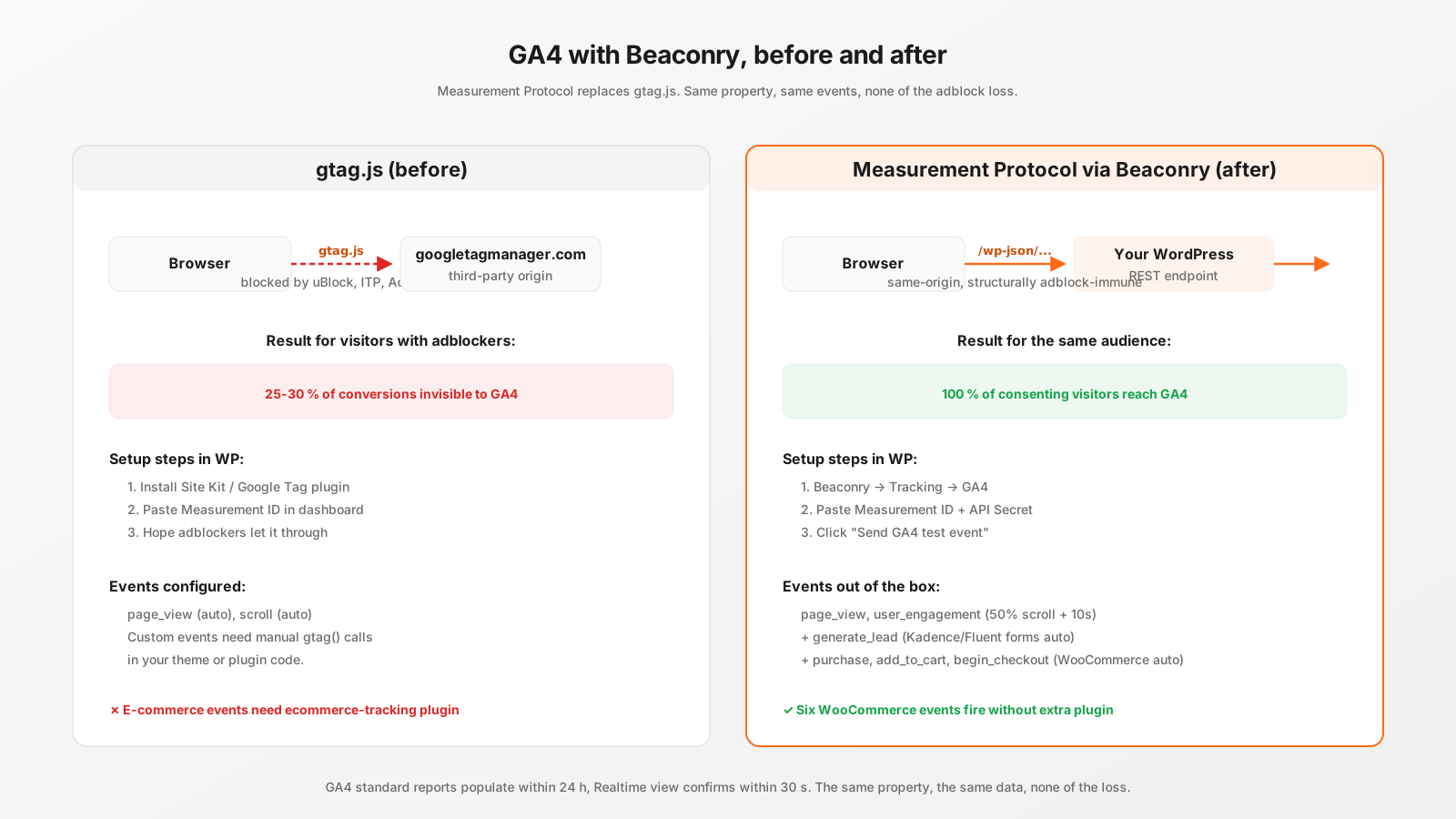
Setup, 90 seconds
GA4 needs two values: the Measurement ID (G-XXXXXXXXXX) and a Measurement Protocol API Secret. Both live under Admin → Data Streams → web stream → Measurement Protocol API secrets. Create one secret labelled "Beaconry plugin", copy both values into Beaconry → Tracking → GA4, save. Done.
The API Secret is encrypted at rest with AES-256-CBC using your WordPress auth salts. If you'd rather keep it out of the database, define BCNR_GA4_MEASUREMENT_ID and BCNR_GA4_API_SECRET in wp-config.php and leave the form fields blank.
Events that ship out of the box
The same six WooCommerce events plus the standard four engagement signals. No gtag('event', ...) calls in your theme code, no Site Kit, no Tag Manager container.
page_viewon every consented page-load.user_engagementat 50 % scroll plus 10 seconds (the GA4-canonical "engaged session" trigger).generate_leadon every Kadence Blocks Form or Fluent Forms submission.view_item,add_to_cart,begin_checkout,purchasefor WooCommerce.refundon order-status flip to refunded, with negative value, same event_id as the original purchase.
All events fire with the visitor's client_id (constructed from a stable cookie value), session_id (Beaconry generates and persists for 30 minutes inactivity), and the relevant click-IDs from the nl_ext cookie when present.
What gets sent vs gtag
Functionally identical from GA4's perspective. The only difference is the request origin: https://www.google-analytics.com/mp/collect via your WordPress server (server-to-server) vs the same URL from the visitor's browser (which adblockers block).
Beaconry forwards the event payload as a single MP request per event. The visitor's browser sees one request to /wp-json/beaconry/v1/event on your domain (200 bytes, same-origin). The browser does not see www.google-analytics.com at all unless you have hybrid mode enabled (which for GA4 we don't recommend, since gtag adds 60 KB and there's no first-party-cookie advantage like there is for Meta).
Recommended GA4-side settings
Inside GA4, three configurations make the data more useful regardless of tracking tool:
- Data retention: 14 months (Admin → Data Retention). Default is 2 months, too short for year-over-year comparisons.
- Reporting currency matches your shop's currency (Admin → Property details).
- Mark events as conversions for
generate_lead,purchase,sign_up,contact(Configure → Events → toggle "Mark as conversion").
None of these are Beaconry-specific. They're just sensible GA4 hygiene.
Verification
GA4 → Reports → Realtime confirms events arriving within 30 seconds. The DebugView tab shows individual events with full parameter detail; Beaconry has a per-channel debug-mode toggle that adds debug_mode: true to the payload, which routes events to DebugView instead of the standard reports. Useful during staging, remove before launch.
Where this saves you money
Adblock recovery is the headline benefit, but GA4 has a second cost vector: the BigQuery export. If you sell via WooCommerce and want clean conversion data in BigQuery for downstream attribution modelling, the data has to actually arrive in GA4 first. Server-side dispatch closes that gap. The 25-30% of conversions that gtag missed are now in BigQuery, not just in your head.
What Beaconry does NOT replace
- Custom dimensions and metrics: those are GA4-side configuration; Beaconry sends event parameters, GA4 maps them to dimensions per your config.
- Audience definitions: define audiences in GA4, Beaconry just feeds events.
- Funnel and exploration reports: GA4 builds these from the event stream Beaconry provides.
Take-away
For GA4, the answer is unambiguous: switch to Measurement Protocol via Beaconry, leave gtag off, gain 25-30% conversion volume back in your reports. Setup is 90 seconds, the API contract is unchanged from GA4's perspective, and you stop shipping the gtag bytecode to your visitors.