
Beaconry vs Stape vs GTM Server-Side: same outcome, very different mechanics
All three claim "server-side tracking". All three end up with different adblock-resistance, different DNS setup, different monthly bills. Side-by-side teardown of the dispatch path on each, plus when one of the other two is genuinely the better fit.
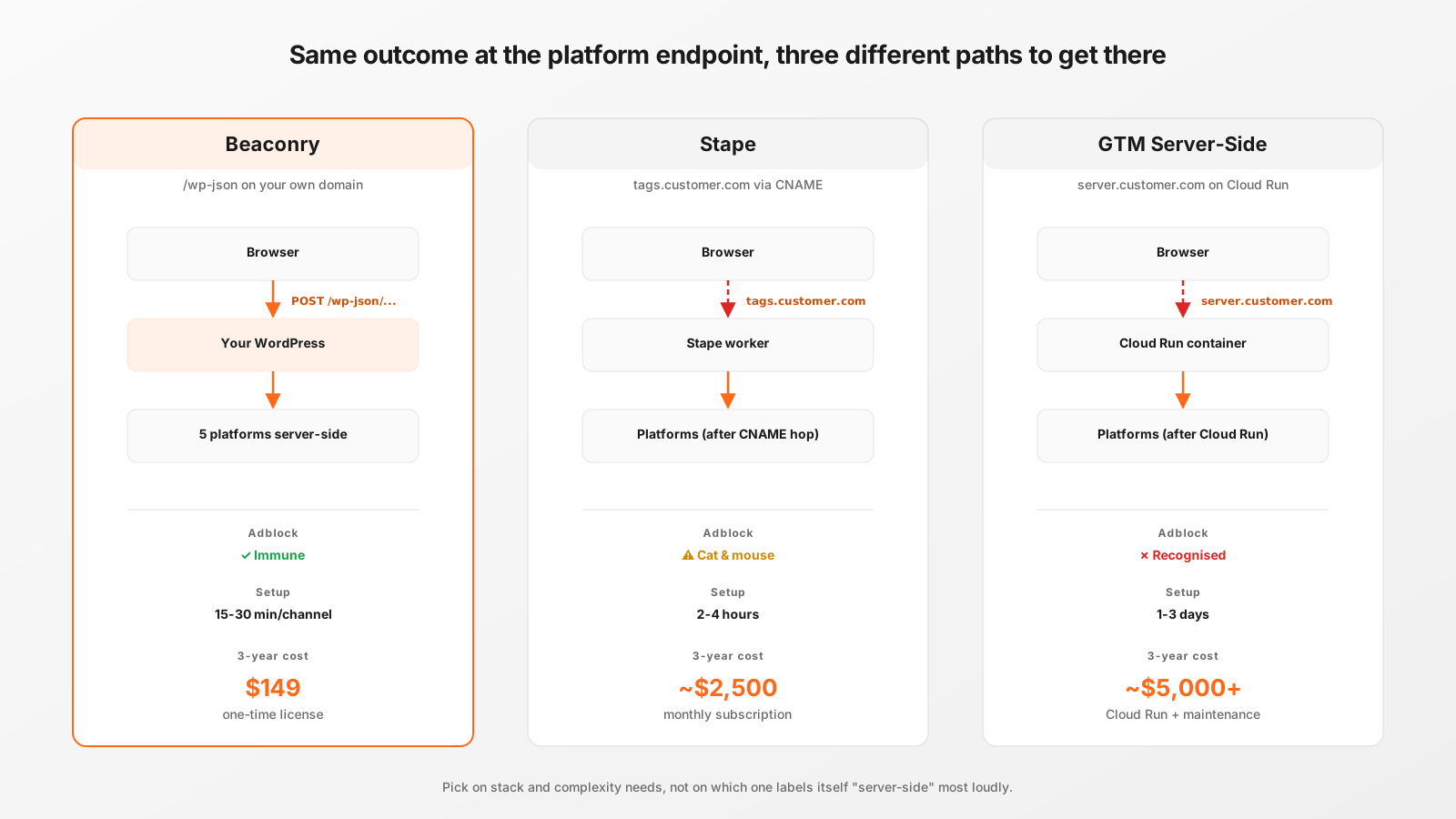
The three dispatch paths
Each tool ultimately ends at the same set of platform APIs (Meta CAPI, Google Ads API, GA4 Measurement Protocol, etc.). The differences are entirely on the path between the browser and that endpoint.
- Beaconry: browser POSTs to
/wp-json/beaconry/v1/eventon the customer's own WordPress install. WordPress dispatches to the platforms server-to-server. - Stape: browser loads
https://tags.customer.com/gtm.js, which is a CNAME to a Stape-hosted worker. Stape's worker routes events through tag templates and dispatches. - GTM Server-Side: browser loads
https://server.customer.com/gtm.js, which is a CNAME (or A-record) to a Cloud Run container the customer runs themselves. Container executes tag templates and dispatches.
Adblock-resistance
The single most consequential difference, and the one most often glossed over in comparison decks:
- Beaconry: structurally adblock-immune.
/wp-json/is the WordPress core REST namespace; blocking it would break WordPress itself. Tested against uBlock Origin, Brave Shields, AdGuard, NextDNS, Pi-hole, all let it through. Custom JSON payload, no recognisable Pixel-format signature. - Stape: vulnerable to CNAME-cloaking detection. Brave Shields enables it by default, uBlock as an opt-in, NextDNS does it server-side. Filter-list maintainers add Stape-pattern detection over time. The cat-and-mouse game has Stape rotating worker domains, with a few weeks of headroom each cycle. Treat as "mostly works", not "works".
- GTM Server-Side: same dynamic as Stape, plus the GTM browser-side
gtm.jsbytecode is itself recognised by some content-based filter rules. CNAME hides the destination, content fingerprint can still expose it.
Concrete impact: a B2B audience with 35 % adblock rate sees roughly 5-15 % conversion loss on Stape/GTM SS over a quarter, depending on filter-list update cycles. Beaconry's number stays near zero across the same window.
Setup time
- Beaconry: install the plugin, paste credentials, send test events. Live in 15 to 30 minutes per channel. Five channels (Meta, TikTok, Google Ads, LinkedIn, GA4) typically take an afternoon to wire up cleanly.
- Stape: signup, point CNAME to Stape, configure tag templates in Stape's UI, send test events. 2 to 4 hours for a typical setup, more if your tag-template logic is non-standard.
- GTM Server-Side: provision GCP project, deploy Cloud Run container, configure DNS, set up SSL, write tag templates in GTM, test. 1 to 3 days for a typical setup, days more if your team isn't already GCP-fluent.
Pricing
- Beaconry: one-time license. Solo $69, Studio $149, Agency $349. Lifetime updates included. No metered usage, no per-event cost.
- Stape: monthly subscription, scales with traffic. Smallest plan is around $20-30/month for limited volume. Mid-traffic sites end up at $50-100/month. High-traffic at $100-300/month.
- GTM Server-Side: Cloud Run pricing, scales with request volume. Low-traffic sites $30-50/month, mid-traffic $100-300/month, high-traffic $500+/month. Plus engineering time to maintain the Cloud Run container, tag templates, container updates.
Total cost of ownership over 3 years on a mid-traffic site: Beaconry $149, Stape ~$2,500, GTM SS ~$5,000+ (Cloud Run + maintenance time). The headline price gap is real; the engineering-time gap on GTM SS is bigger than it looks on the bill.
Tag-template engine and customisation
This is where the comparison flips. Beaconry doesn't have a tag-template engine: it ships with hardcoded support for Meta, TikTok, Google Ads, LinkedIn, GA4 plus WooCommerce / Kadence / Fluent hooks. Five channels, opinionated mapping. Adding a sixth channel means a plugin update, not a customer-side template change.
- Beaconry: opinionated, fast to set up, no template language to learn. Wrong fit if you need custom tags for a niche ad network or a custom analytics endpoint.
- Stape: full GTM-compatible template engine in their UI. Rich library of pre-built templates. Can build custom templates with sandboxed JavaScript. Right fit if you need many custom tags.
- GTM Server-Side: same template engine as Stape (both are GTM under the hood), plus you control the container so you can add custom code paths. Right fit if you need maximum flexibility and have engineering capacity.
Multi-tenant agency scenarios
Agencies running tracking for many clients end up making different choices:
- Beaconry Agency tier: $349 one-time, unlimited client-site activations. Each client's WP holds their own credentials. Separate WP installs = separate seats counted. Right fit if clients are mostly WordPress and the agency wants predictable cost.
- Stape: per-client subscription, agencies often resell to clients with margin. Right fit if clients are non-WordPress or the agency wants to centralise tag management across diverse stacks.
- GTM Server-Side: each client typically owns their own GCP project and Cloud Run. Agency operates them but doesn't usually pay for them. Right fit for high-touch enterprise consulting engagements.
Non-WordPress stacks
Beaconry is WordPress-only by architecture. The same-origin REST endpoint is /wp-json/..., which only WordPress serves. If your stack is Shopify, Webflow, custom Node.js, anything that isn't WordPress, Beaconry doesn't work for you.
- Shopify with server-side tracking: Stape has Shopify-specific tooling, GTM SS works but requires custom integration.
- Webflow / Squarespace / Wix: GTM SS via Cloud Run, Stape if their integration covers your platform.
- Custom Node.js / Rails / Django: GTM SS or self-built. Stape if their template fits.
- Headless commerce + Next.js / Astro: depends on the back-end. If WordPress is the headless source, Beaconry can sit on the WP side and dispatch from there.
When NOT to pick Beaconry
Concrete cases where one of the other two is genuinely the better fit:
- Your stack is not WordPress.
- You need custom tag templates for a niche channel Beaconry doesn't ship.
- You need a UI for non-engineering team members to add and modify tracking without a plugin update.
- You already have a working GTM Server-Side setup and migration cost outweighs the Beaconry savings.
- You're an enterprise with a dedicated tracking-engineering team and want maximum control.
Migration paths
If you decide to move to Beaconry, the migration steps depend on what you're leaving:
From Stape: install Beaconry, configure the same five channels with the credentials you already have. Run both in parallel for a week with hybrid mode off on Beaconry, monitor the platform reports, Beaconry's volume should match or exceed Stape's. When confidence is there, remove the Stape CNAME and disable the Stape tag templates. No data loss, no historical attribution loss (the platform-side history is the platform's, not the dispatch tool's).
From GTM Server-Side: same parallel-run approach. Keep Cloud Run alive for the parallel period, monitor side-by-side. Decommission Cloud Run once Beaconry has a week of clean numbers. The migration is simpler than the original GTM SS setup; the tricky part is decommissioning the Cloud Run container without leaving DNS records pointing at nothing.
From browser-only GA4 / Meta Pixel: install Beaconry, configure, and your hybrid-mode events will deduplicate against the existing browser pixel via stable event_id. Zero double-counting, zero data loss, immediately better adblock resistance.
Take-away
Three different tools serving the same use-case at different points on the complexity-vs-flexibility spectrum. Beaconry is the right pick for WordPress-based small-to-mid customers who want predictable cost, fast setup and structural adblock resistance. Stape and GTM Server-Side are the right pick for non-WordPress, custom-tag-heavy, or enterprise scenarios where flexibility outweighs setup time. Pick based on stack and complexity needs, not on which one labels itself "server-side" most loudly.