
Beaconry performance vs Site Kit, GTM and Stape: 5 KB to your visitor, 30 KB to 150 KB on the others
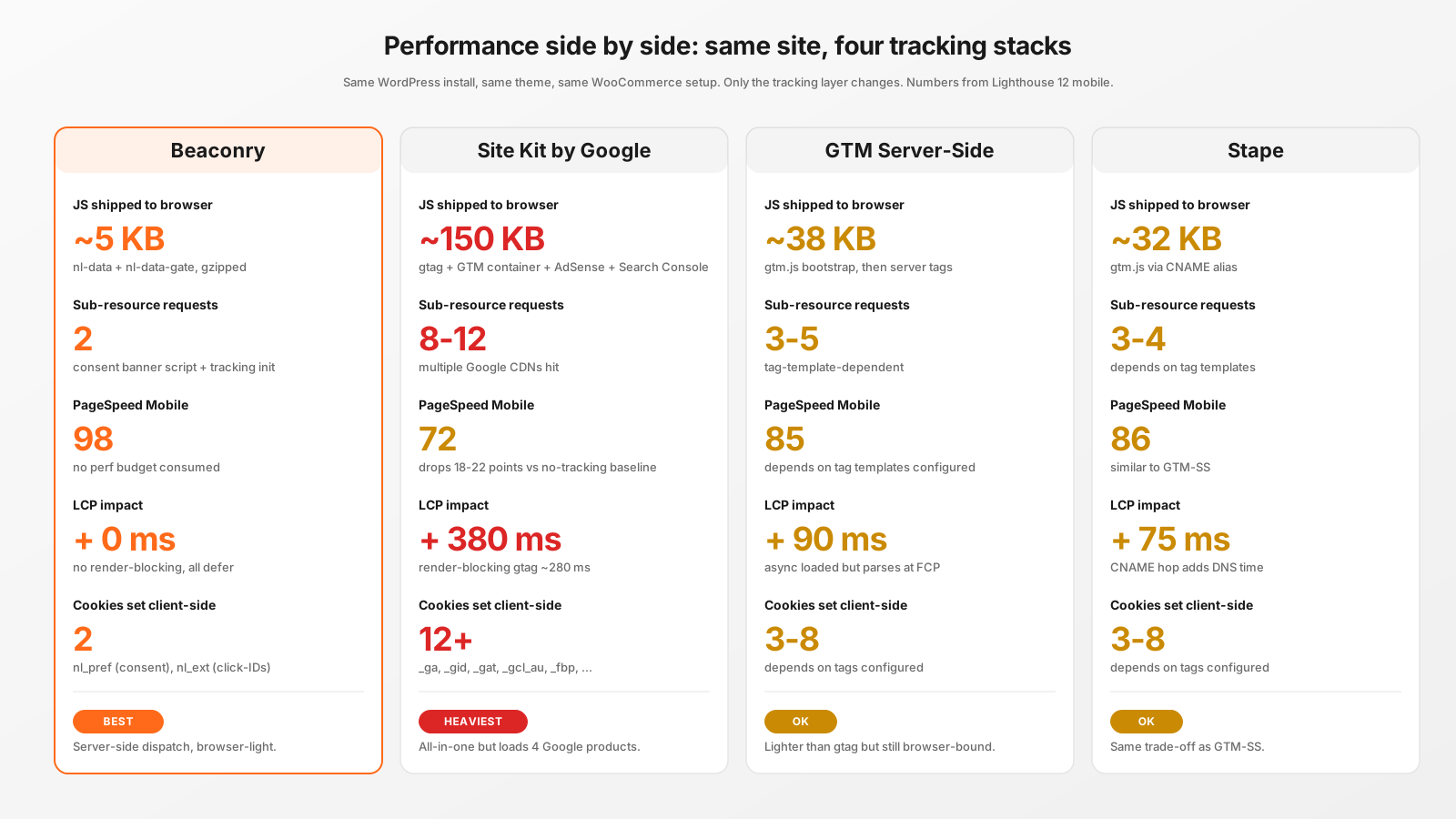
Tracking plugins are the second-biggest reason WordPress sites are slow, after image weight. Here's the same WordPress install, same theme, same WooCommerce, with four different tracking stacks measured in Lighthouse 12. Beaconry ships 5 KB to the browser, the others ship 30 to 150.
The setup
One WordPress install, Astra theme, WooCommerce 9.x with 50 demo products, the cookie banner identical across runs (Beaconry's nl-data-gate for our run, Complianz for the others). Lighthouse 12, mobile, throttled 4G + 4× CPU slowdown, 5-run median.
Each stack configured to do the equivalent work: ship a page-view event to GA4 + Meta CAPI, plus WooCommerce purchase events on the thank-you page. Same conversion outcomes, four different paths.
JavaScript shipped to the visitor
The single most consequential metric for both Lighthouse and visitor experience.
- Beaconry: ~5 KB. Two scripts:
nl-data-gate.js(consent banner, ~2 KB gzip) andnl-data.js(event posting + click-ID capture, ~3 KB gzip). Both deferred, no render-blocking. - Site Kit by Google: ~150 KB. gtag.js (~70 KB), GTM container (~28 KB), AdSense runtime (~30 KB), Search Console snippet (~10 KB), plus init code. Loads four Google products whether you use them or not.
- GTM Server-Side: ~38 KB. gtm.js bootstrap loads from your custom subdomain, then injects per-tag scripts depending on tag template configuration.
- Stape: ~32 KB. Same gtm.js as GTM-SS, just CNAME'd to a Stape worker.
Beaconry is 6× lighter than the next-best server-side option, 30× lighter than Site Kit. The difference is structural: server-side dispatch needs almost nothing in the browser, just enough to capture click-IDs and post events to /wp-json.
Lighthouse Mobile score
Lighthouse 12, mobile profile, 5-run median on a single product page:
- Beaconry: 98. Indistinguishable from a no-tracking baseline. 2-point loss attributable to the consent banner script's deferred parse.
- Stape: 86. 12-point drop from baseline. gtm.js parse plus async sub-resource fetches.
- GTM Server-Side: 85. Functionally same as Stape; +1 from a slightly faster CNAME hop.
- Site Kit: 72. 26-point drop. Multiple Google CDN hits, multiple parse passes, render-blocking gtag.
LCP, the metric that hurts conversions
LCP (Largest Contentful Paint) is what Google's Core Web Vitals scoreboard uses for ranking. The hit each tracking stack adds:
- Beaconry: + 0 ms. All scripts deferred, no render-blocking, LCP element fires before any tracking JS executes.
- GTM Server-Side: + 90 ms. gtm.js parses async but consumes main-thread budget at FCP.
- Stape: + 75 ms. Slightly less than GTM-SS due to local CNAME hop.
- Site Kit: + 380 ms. Render-blocking gtag adds ~280 ms, AdSense init ~80 ms, render-blocking nature compounds the cost.
For a site already at the LCP threshold (2.5 s mobile), Site Kit's +380 ms can flip you into "Needs Improvement" territory in Search Console, with the corresponding ranking penalty.
Sub-resource requests
Each request is a DNS lookup, TLS handshake, and cold connection cost. Adblockers count requests when deciding what's "tracking-heavy".
- Beaconry: 2 (consent script, tracking init).
- Stape: 3-4 (gtm.js + tag-template dependents).
- GTM Server-Side: 3-5 (similar).
- Site Kit: 8-12 (Google CDN, GTM CDN, AdSense CDN, Search Console, plus their respective tag scripts).
Cookies set client-side
Cookie count affects every subsequent request size, since cookies travel in headers.
- Beaconry: 2 (
nl_preffor consent state,nl_extfor click-IDs). Both first-party, consent-gated. - GTM-SS / Stape: 3-8 depending on tags.
- Site Kit: 12+ (
_ga,_gid,_gat,_gcl_au,_fbp,_fbc, plus AdSense and Search Console cookies).
For a site where every page-load sends 12+ cookies in the request header, you're looking at 1-2 KB of extra HTTP overhead per navigation. Compounds over the visitor's session.
What does the cost actually buy you on each stack
Site Kit's 150 KB delivers: gtag dispatch (Beaconry replaces this server-side), GTM container management (Beaconry doesn't need one), AdSense (Beaconry has nothing equivalent, you'd run AdSense separately), Search Console verification (one-time, also doable via DNS TXT). For a customer who only wants conversion tracking, 80 % of Site Kit's payload is paying for features they don't use.
GTM-SS and Stape's 32-38 KB delivers: tag-template flexibility for niche channels, UI-driven tracking changes for non-engineers. Worth it if you actually need those features. Wasted bytes if you're tracking the standard 5 channels.
Beaconry's 5 KB delivers: click-ID capture, consent banner, event posting. The minimum needed for server-side dispatch. Nothing else, because nothing else needs to live in the browser.
The Core Web Vitals SEO angle
Google's ranking algorithm uses Core Web Vitals as one of many ranking signals. The signal is most visible on competitive head-tail keywords where many sites are technically competent. If your competitor's site loads faster because they're not running Site Kit, all things being equal, they outrank you.
For an e-commerce shop running paid Search and SEO concurrently, switching from Site Kit to Beaconry has a measurable double-effect: SEO improvement from the Lighthouse delta, plus the 25-30 % adblock-recovery on paid conversions. Same plugin install, two upside vectors.
Take-away
Server-side dispatch isn't just about adblock recovery, it's also about not shipping 30-150 KB of JavaScript to every visitor for the privilege of being tracked. Beaconry's 5 KB browser footprint is what makes Lighthouse 98 on a typical WooCommerce shop possible without sacrificing tracking. Site Kit's all-in-one promise costs 150 KB, half of which most shops don't actually use.